
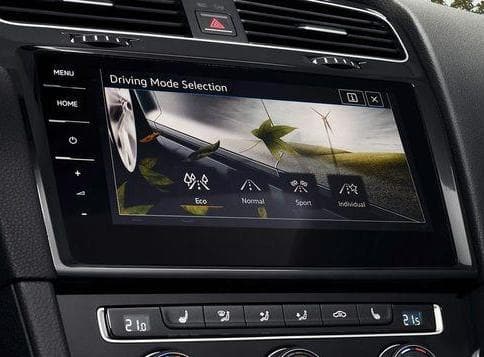
Purpose: Displays the “Driving Mode” (Drive Select) menu on the Discover MIB2. This may need to be enabled after replacing the MIB if the driving modes are no longer available.
Watch out! There are 4 lines of coding to do here.
Proceed :
1 – Engine off, ignition off, connect your official VAG-COM VCDS cable to the computer, then plug the other end into your vehicle’s diagnostics socket.
2 – Switch on the ignition and run the VCDS program.
Line 1:
3 – Click on“Select” then click on“5F – Electr. information”.
4 – Click on“Security Access – 16” then enter the code“20103”.
5 – Click on“Adaptation – 10”.
6 – At the very top of this page, there is a drop-down menu.
From this drop-down menu, select “Car_Function_Adaptations_Gen2-menu_display_charisma“
7 – On this same page, there is a second drop-down menu at the bottom
of the page.
On this menu, choose the“active” value.
Line 2:
3 – Click on“Select” then click on“5F – Electr. information”.
4 – Click on“Security Access – 16” then enter the code“20103”.
5 – Click on“Adaptation – 10”.
6 – At the very top of this page, there is a drop-down menu.
From this drop-down menu, select “Car_Function_Adaptations_Gen2-menu_display_charisma_over_threshold_high“
7 – On this same page, there is a second drop-down menu at the bottom
of the page.
On this menu, choose the“active” value.
Line 3:
3 – Click on“Select” then click on“5F – Electr. information”.
4 – Click on“Security Access – 16” then enter the code“20103”.
5 – Click on“Adaptation – 10”.
6 – At the very top of this page, there is a drop-down menu.
From this drop-down menu, select “Car_Function_List_BAP_Gen2-charima_0x17“
7 – On this same page, there is a second drop-down menu at the bottom
of the page.
On this menu, select“active” and confirm.
Line 4:
3 – Click on“Select” then click on“5F – Electr. information”.
4 – Click on“Security Access – 16” then enter the code“20103”.
5 – Click on“Adaptation – 10”.
6 – At the very top of this page, there is a drop-down menu.
From this drop-down menu, select “Car_Function_List_BAP_Gen2-charima_0x17_msg_bus“
7 – On this same page, there is a second drop-down menu located toward the bottom
of the page.
From this menu, select “Infotainment data bus” and then confirm.
This post is also available in:
 Français (French)
