
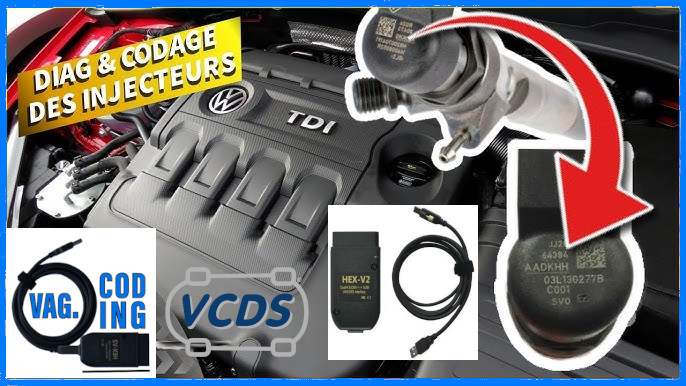
How to adapt, program, and code an injector by recording its IMA code and correction values on 1.2, 1.6, 2.0, 2.7, and 3.0 TDI Common Rail engines (CR) engines from Volkswagen, Audi, Seat, and Skoda using VCDS / OBDeleven / ODIS. Tutorial for learning and coding injector correction values after replacement.
Adjusting the injector correction values is a crucial step in the maintenance of a Volkswagen, Audi, Seat, or Skoda engine, particularly when replacing an injector or the engine control module. This adjustment ensures proper engine operation by entering the injector’s IMA code into the engine control module, thereby ensuring precise correction when the injector opens. In this tutorial, we’ll guide you through the adaptation process using the VCDS, OBDeleven, and ODIS diagnostic tools.
Note: IP (injector-pump) engines do not require coding.
-> VCDS: Checking Injector Values
-> VCDS: DPF Regeneration
-> VCDS: Turbo Pressure Check
Preparation:
Before you start, make sure you have the necessary tools:
- A VCDS cable or ODIS device compatible with your vehicle.
- A laptop with VCDS or ODIS software installed and running.
- IMA codes for injectors to be replaced or adapted.
This adaptation must be carried out each time an injector or the motor housing is replaced.
If the engine ECU has been replaced, all injectors must be readapted.
The purpose of this adaptation is to introduce the IMA IIC code written on the upper part of the injector into the motor housing.
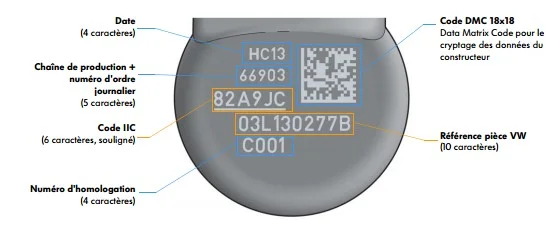
Thanks to this code, the motor control unit determines the tolerance level of the piezoelectric actuator of each injector, making the appropriate corrections when applying the opening voltage.
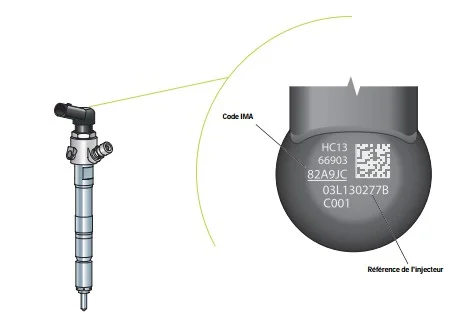
Incorrectly entering this code may cause the motor to behave erratically or even fail to start.
Contents:
- Adjustment of the IMA code for fuel injectors on 1.6 / 2.0 TDI CR engines (VW Golf 6/7, Polo, Audi A3, Seat Leon, Ibiza, Skoda)
- Adjustment of the IMA code for fuel injectors on the 1.2 TDI CR engine (VW Polo 5, Seat Ibiza, Skoda Fabia)
- Adjustment of the IMA code for fuel injectors on 2.7 / 3.0 V6 TDI CR engines (Audi A4 B8/A5 8T/Q5/Q7…)
To tune your fuel injector, VAG Coding offers three tutorials tailored to your TDI CR diesel engine
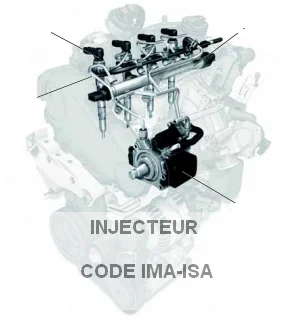
Adjustment of the IMA code for fuel injectors in 1.6/2.0 TDI Common Rail engines (VW Golf 6/7, Polo, Audi A3, Seat Leon, Ibiza, Skoda)
Proceed :
1 – Engine off, ignition off, connect your official VAG-COM VCDS cable to
the computer, then plug the other end into your vehicle’s diagnostics socket.
2 – Switch on the ignition and run the VCDS program.
3 – Click on“Select”, then click on“01 – Motor“.
4 – Click on“Security Access – 16” then enter the code“27971“.
5 – Click on“Adaptation – 10”.
Adapting injectors:
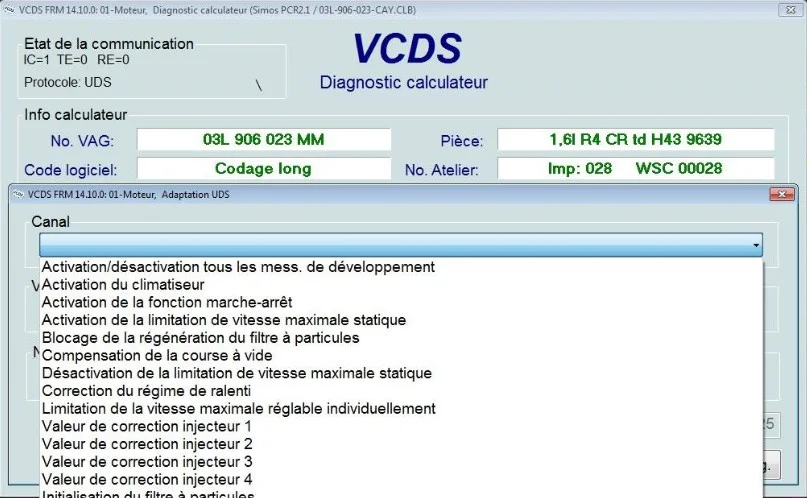
In the engine module, look for the injector adaptation option. This option may be listed under different names depending on the software used, but you should find it in a form similar to this one ( Injector correction value 1/2/3/4 ):
Entering IMA codes:
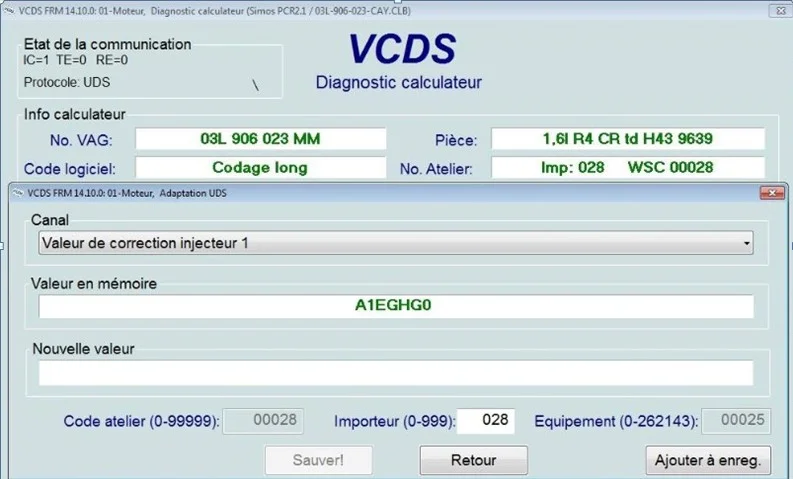
Follow the on-screen instructions to enter the IMA codes of the injectors to be replaced or adapted. Be sure to enter the codes in CAPITAL LETTERS and, in some cases, add a zero to the end of the IMA code if necessary.
Conclusion:
By following these simple steps, you can easily adapt the individual injector correction values on your Volkswagen using VCDS or ODIS. Always follow the manufacturer’s instructions and use accurate IMA codes to ensure your engine runs smoothly.
Adjustment of the IMA code for fuel injectors on the 1.2 TDI Common Rail engine (VW Polo 5, Seat Ibiza, Skoda Fabia)
For the 1.2 TDI engine (engine code CFWA), found in particular in the Volkswagen Polo 5 (6R), Seat Ibiza, and Skoda Fabia / Roomster (5J), here is the key information regarding the fuel injectors (typically manufactured by Delphi)
Key References
- Références OEM constructeur :
03P130277ou03P130277A - OEM part number (Delphi):
28231462
The IMA-ISA values must be adjusted when:
- One or more injection valves have been replaced. Be sure not to adjust any valves that have not been replaced!
- The engine control module has been replaced.
- DO NOT adjust these values unless you have replaced one of the parts listed above, nor should you do so for training or demonstration purposes.
The calibration code can be found on the injector itself. It is usually a 7-digit number, but the 1.2 TDI uses Delphi injectors with a 20-digit code. The 20-digit code on the injector must be converted before the control module accepts the value.
Use the following table to convert the code(s):
| Value on the injector | Equal | Converted code |
|---|---|---|
| 0 | > > | 00 |
| 1 | > > | 01 |
| 2 | > > | 02 |
| 3 | > > | 03 |
| 4 | > > | 04 |
| 5 | > > | 05 |
| 6 | > > | 06 |
| 7 | > > | 07 |
| 8 | > > | 08 |
| 9 | > > | 09 |
| A | > > | 0A |
| B | > > | 0B |
| C | > > | 0C |
| D | > > | 0D |
| E | > > | 0E |
| F | > > | 0F |
| G | > > | 10 |
| H | > > | 11 |
| J | > > | 12 |
| K | > > | 13 |
| L | > > | 14 |
| M | > > | 15 |
| N | > > | 16 |
| P | > > | 17 |
| R | > > | 18 |
| S | > > | 19 |
| T | > > | 1A |
| U | > > | 1B |
| W | > > | 1C |
| X | > > | 1D |
| Y | > > | 1E |
| Z | > > | 1F |
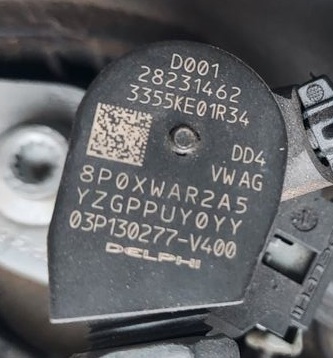
Example IMA Code: 8P0XWAR2A5YZGPPUY0YY
After conversion, spaces must be inserted in the code. Using the injector example, the new value for the adaptation channel is: 08 17 00 1D 1C 0A 18 02 0A 05 1E 1F 10 17 17 1B 1E 00 1E 1E
Prerequisites:
- New IMA-ISA codes for the fuel injector are available, and the fuel injector(s) is/are installed.
- Ignition ON
- Engine OFF
Procedure:
1– Engine off, ignition off, connect your official VAG-COM VCDS cable to
the computer, then plug the other end into your vehicle’s diagnostics socket.
2– Switch on the ignition and run the VCDS program.
3 – Click “Select,” then click “01 – Engine.”
4 – Click “Security Access – 16,” then enter the code “27971.”
5 – Click “Adaptation – 10.”
Channel: Injector 1 correction value
Channel: Injector 2 correction value
Channel: Injector 3 correction value
Enter the converted values for each injector.
[Test]
[Save]
[Done, Back]
- Turn the power OFF, wait 10 seconds, and then turn it back on. The settings should now be saved; please verify them by double-checking the adaptation values.
Notes:
- If the IMA-ISA value on the new injector is difficult to read, try scanning the QR code with a smartphone app.
Adjustment of the IMA code for fuel injectors on 2.7- and 3.0-liter V6 TDI Common Rail engines (Audi A4 B8 / A5 8T / Q5 / Q7…)
If you’ve just replaced an injector on your V6 TDI Common Rail engine, it’s crucial to adapt the IMA-ISA codes to ensure optimum engine idle speed and reduced fuel consumption. Here’s how to adapt these codes via VCDS.
Procedure:
1– Engine off, ignition off, connect your official VAG-COM VCDS cable to
the computer, then plug the other end into your vehicle’s diagnostics socket.
2– Switch on the ignition and run the VCDS program.
3 – Click on“Select”, then click on“01 – Motor“.
4 – Click on“Security Access – 16” then enter the code for your engine
–> List of Security Access codes for EDC ECUs
5 – Click on“Adaptation – 10“.
- You will see the following channels for each cylinder:
- Channel 071: IMA-ISA Cylinder 1 report
- Channel 072: IMA-ISA Cylinder 2 report
- Channel 073: IMA-ISA Cylinder 3 report
- Channel 074: IMA-ISA Cylinder 4 report
- Channel 075: IMA-ISA Cylinder 5 report
- Channel 076: IMA-ISA Cylinder 6 report
- Enter the new IMA code for each cylinder in the corresponding channels.
- Click on [Test], then on [Save]. When finished, click on [Done, Go Back].
- Switch off the ignition, wait 10 seconds, then switch on the ignition. The values should now be saved. Please check them by double-checking the adaptation values.
By following this procedure carefully, you can ensure that the new IMA-ISA codes are properly configured for your V6 TDI Common Rail engine, thereby ensuring optimal operation and efficient performance.
IMA-ISA values must be adjusted when :
One or more injection valves have been replaced. Be sure not to adjust valves that have not been changed!
- The motor control module has been replaced.
- Do not adapt these values when you have not replaced any of the above items, nor for training or demonstration purposes.
- The setting code can be found on the injector itself, it is a 7-digit value and uses only the following characters: 1,2,3,4,5,6,7,8, A, B, C, D, E, F, G, H, K, L, M, N, O, P, R, S, T, U, V, W, X, Y, Z.
- A value of AAAAAAA is also invalid.
This post is also available in:
 Français (French)
