
VCDS: What is SFD and SFD2 protection?
SFD (Schutz der FahrzeugDiagnose) is a protection system implemented by the Volkswagen Group to secure access to the control modules in modern vehicles.
In particular, this protection restricts certain modification operations, such as coding, adjustments, basic settings, and certain actuator tests.
However, standard diagnostics are generally still possible: reading the ECU data, retrieving fault codes, and viewing measurement values are not blocked by SFD.
With the introduction of newer vehicles, Volkswagen subsequently enhanced this system with SFD2.
⚠️ SFD and SFD2 should not be confused. SFD2 is an extension of the SFD system with additional security mechanisms.
What does SFD stand for?
SFD stands for:
Protection of Vehicle Diagnostics
which can be translated as:
Vehicle Diagnostic Protection.
SFD began to be deployed in VAG vehicles starting with the 2020 model year and was then gradually expanded to include more models and control modules.
It is important to understand that SFD does not necessarily protect all of a vehicle’s control modules.
A single vehicle may have:
- computers without SFD;
- SFD-protected computers;
- controllers protected by SFD2;
- computers protected by multiple security measures.
Why does Volkswagen use SFD?
The goal of SFD is to prevent unauthorized modifications to the control units.
In particular, it can protect:
- encoding;
- adaptations;
- basic settings;
- actuator testing;
- certain programming functions.
This development is also part of the overall strengthening of automotive cybersecurity and compliance with UNECE Regulations R155 and R156.
Which vehicles are covered by SFD?
SFD was gradually introduced on VAG models starting with the 2020/2021 model years.
You can find him on the following sites, among others:
- Volkswagen Golf 8
- Volkswagen ID.3
- Volkswagen ID.4
- Volkswagen Tiguan
- Volkswagen Caddy
- Audi A3 8Y
- Audi Q4 e-tron
- SEAT Leon
- CUPRA Formentor
- Škoda Octavia
- Škoda Enyaq
⚠️ This list is not exhaustive.
Above all, the presence of SFD depends on the control module, not just the model.
How can you tell if a computer is protected by SFD?
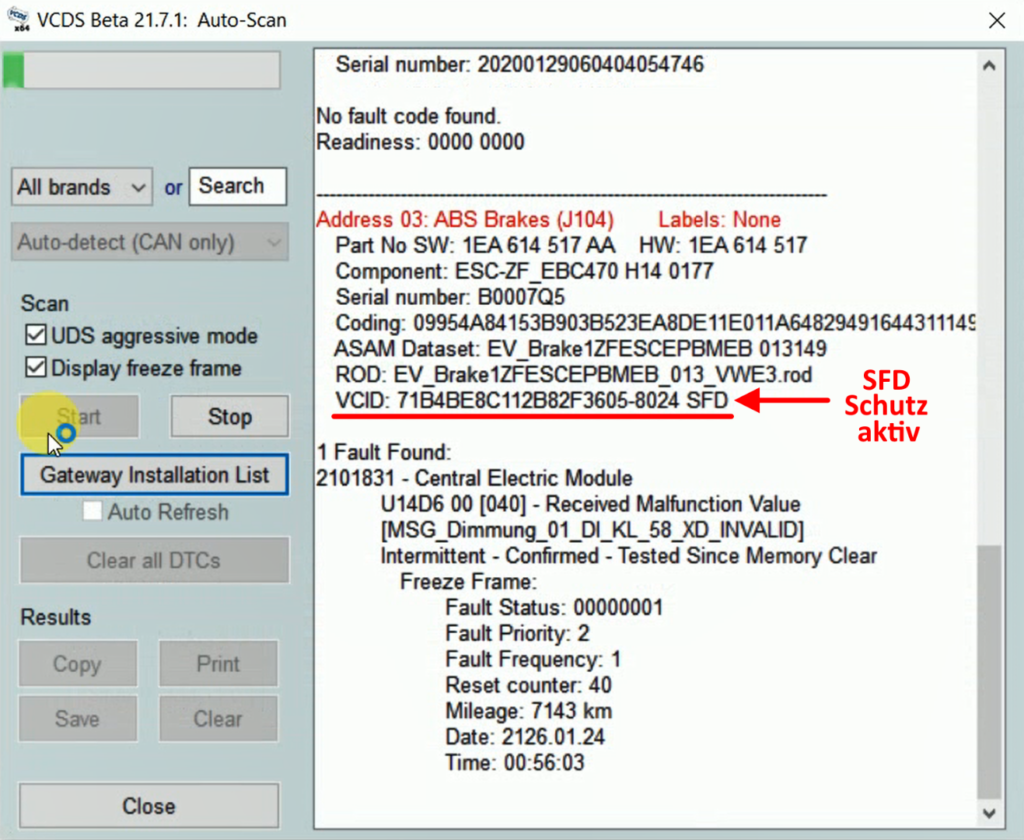
The easiest way to use VCDS is to run an Auto-Scan.
In the VCID line of the ECU, VCDS may display the following message:
SFD
For example:
VCID: XXXXXXXX SFD
This indicates that the ECU requires an SFD unlock for certain protected operations.
What can you do without unlocking SFD?
SFD does not completely block the diagnosis.
It is generally still possible to:
- read the ECU identification;
- read the trouble codes;
- view the measurement values;
- perform certain maintenance tasks.
However, some features may be disabled:
- ❌ Coding
- ❌ Adaptation
- ❌ Basic Settings
- ❌ Actuator Tests
The level of protection depends on the control unit and the requested function.
🔐 Unlock SFD with a VCDS token
VCDS allows you to temporarily unlock an SFD control module using an SFD token.
This method allows you to obtain temporary authorization to perform protected operations.
⚠️ This procedure applies to SFD. It does not allow you to unlock features protected by SFD2.
1. Open the protected calculator
In VCDS, open the relevant control module.
When VCDS detects SFD protection, the button for accessing SFD functions becomes available.
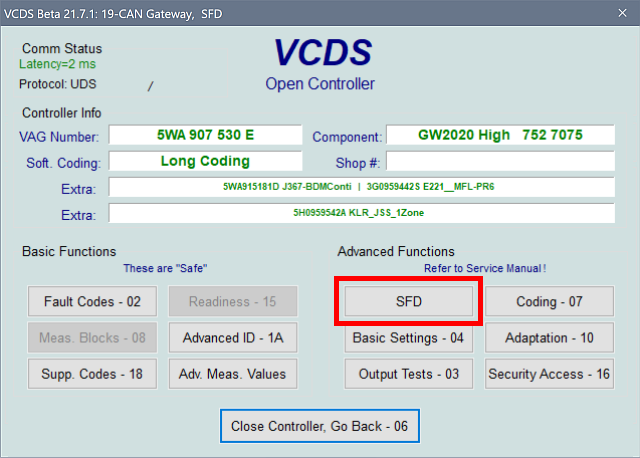
Click on SFD.
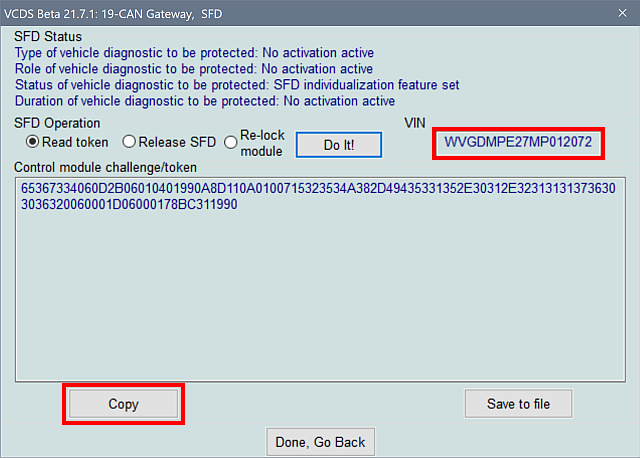
2. Read the SFD token
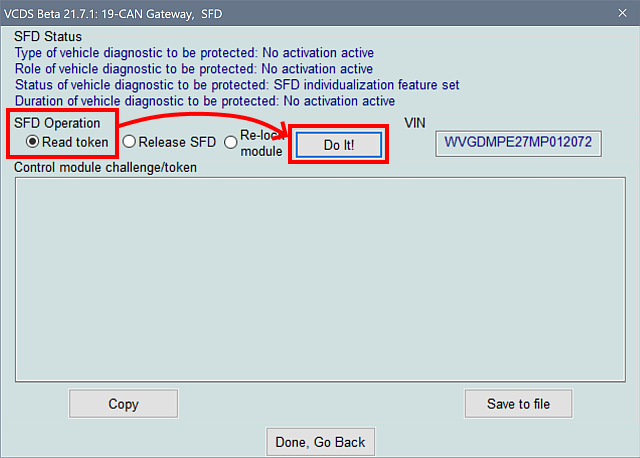
In the SFD window, select:
Read Token
then click:
Do It
VCDS then retrieves the token required for the unlock request.
3. Copy the token
Once the token is displayed, copy it.
This token corresponds to the authorization request generated by the computer.
4. Get the SFD response
The retrieved token must then be used with the service that returns the SFD authorization response.
Once the request has been processed, a cryptographic response is obtained that allows for temporary unlocking.
5. Enter the response in VCDS
Return to the VCDS SFD window.
Enter the answer you obtained in the field provided.
You can use the Paste command to paste it.
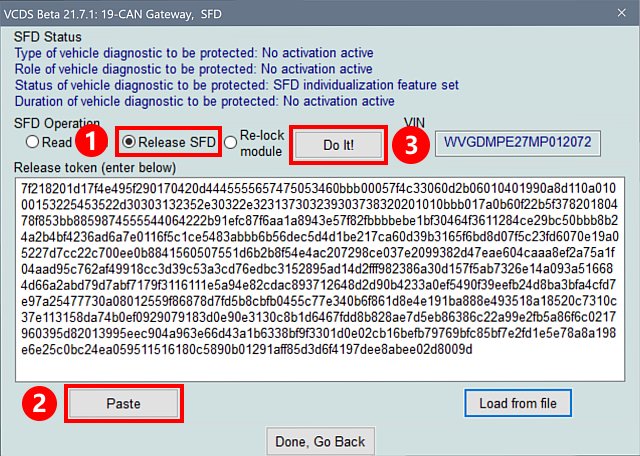
Next, click on:
Do It
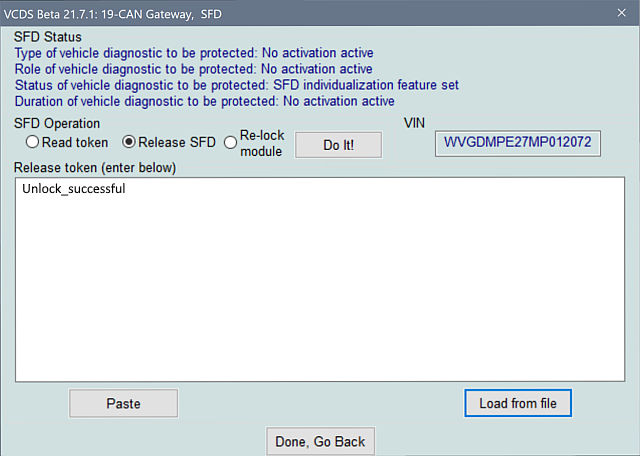
6. The computer is temporarily unlocked
If the response is valid, VCDS obtains the necessary authorization.
Protected functions can then be used during the authorization period.
⏱️ The SFD unlock is temporary
Unlocking does not remove SFD at all.
The computer remains protected.
The authorization simply allows you to temporarily perform the authorized actions.
So we need to talk about:
✅ Temporary SFD unlock
and not:
❌ Elimination of the SFD.
Ross-Tech confirms that SFD and SFD2 cannot be permanently disabled using VCDS or ODIS.
🌐 SFD Online with VCDS
Recent versions of VCDS have also shifted toward online SFD management.
This method allows you to request SFD authorization directly through the service provided for this purpose, rather than always having to go through a manual offline token procedure.
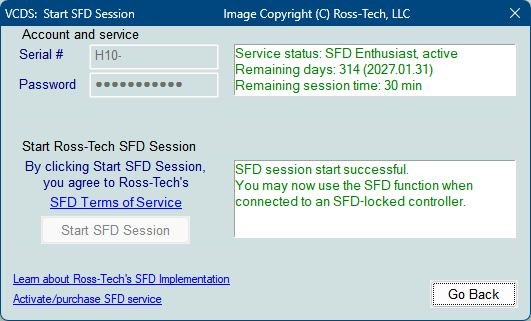
SFD Online and offline SFD tokens are two different methods for managing SFD unlocking.
Availability depends, among other things, on the version of VCDS, the interface used, and the service being accessed.
🔌 VAG Coding Interface Compatibility
VAGCOM HQ V1 – ATMEGA162
VAGCOM HQ V1 interfaces equipped with an ATMEGA162 are primarily intended for older VAG models.
They do not support the SFD functions of newer vehicles.
SFD: 🔴 Not compatible
VAGCOM HQ V2 – STM32F405/429 ARM
VAGCOM HQ V2 interfaces equipped with an STM32F405/429 ARM processor are suitable for newer VAG vehicles.
SFD: 🟢 Compatible depending on the unlocking method used
Please note: Compatibility with a vehicle does not automatically mean that all protected features will be accessible.
📱 SFD with OBDeleven
OBDeleven supports unlocking the classic SFD on many VAG vehicles.
This allows certain encoding and adaptation operations to be performed that are normally protected.
Availability, however, depends on the model, year, control module, and the specific function you are looking for.
🔐 SFD2: The Next Generation of Protection
SFD2 is an extension of the SFD system.
It does not replace SFD.
Its goal is to strengthen protection against unauthorized modifications, particularly on highly sensitive systems.
Ross-Tech states that SFD2 is designed, among other things, to:
- driver-assistance systems;
- automated driving;
- software updates;
- cybersecurity;
- functions subject to the requirements of UNECE Regulations R155 and R156.
With SFD2, certain modifications must be digitally and cryptographically signed by the manufacturer.
🚗 Which vehicles are equipped with SFD2?
SFD2 primarily applies to VAG vehicles manufactured in accordance with the new cybersecurity requirements, specifically starting in 2023/2024, depending on the model.
OBDeleven has published a list of models currently identified as being equipped with SFD2. Since this list is subject to change, it should be considered for informational purposes only.
Audi
| Model | SFD2 starting at |
|---|---|
| A1 GB | 21/03/2024 |
| A3 8Y | 2025 |
| A4 8W | 2024 |
| A5 F5 | 2024 |
| A6 4A | 2024 |
| A7 4K | 2024 |
| A8 4N | 2024 |
| Q2 GA | 21/03/2024 |
| Q3 F3 | 25/03/2024 |
| Q4 F4 | 25/11/2023 |
| Q5 FY | 2024 |
| Q7 4M | 14/08/2023 |
| Q8 4M | 14/08/2023 |
| e-tron GE | 2024 |
| e-tron GT F8 | 2024 |
Volkswagen
| Model | SFD2 starting at |
|---|---|
| Arteon 3H | 2024 |
| Crafter SY | 2025 |
| SB Cart | 2025 |
| Golf 8 CD / CG | 01/04/2024 |
| AE1 Polo Shirt | 12/03/2024 |
| T-Cross D31 | depending on production |
| Touran 5T | 06/03/2024 |
| T-Roc D11 / AC8 | 24/03/2024 |
| Taigo CS | 18/03/2024 |
| Tiguan Allspace BJ2 | 19/02/2024 |
| Tuareg RC | depending on production |
| T7 ST | according to PR-Code |
| ID.3 E12 | 2025 |
| ID.4 E21 | 15/01/2024 |
| ID.5 E39 | 15/01/2024 |
| ID. Buzz EB | 2025 |
Škoda
| Model | SFD2 starting at |
|---|---|
| Enyaq 5A | according to PR-Code |
| Fabia PJ | 2024 |
| Kamiq NW4 | 29/01/2024 |
| Scala NW1 | 29/01/2024 |
| Karoq NU | 25/03/2024 |
| Octavia NX | according to PR-Code |
SEAT / CUPRA
| Model | SFD2 starting at |
|---|---|
| SEAT Arona KJ7 | 12/02/2024 |
| SEAT Ateca KBP / KHP | according to PR-Code |
| SEAT Born K11 | 2025 |
| SEAT Ibiza KJ1 | 12/02/2024 |
| SEAT Leon KL | 2025 |
| SEAT Leon KU | 2025 |
| CUPRA Formentor KM7 | 2025 |
⚠️ A list of vehicles isn’t enough
Even with this list, you should not assume that a vehicle is fully locked by SFD2.
SFD2 may affect certain control modules and functions.
The best way to check a specific vehicle is therefore to look at its VCDS Auto-Scan.
🔎 How do you identify SFD2 using VCDS?
In Auto-Scan mode, a diagnostic scanner can display:
SFD+SFD2
Or in the Calculator Settings:
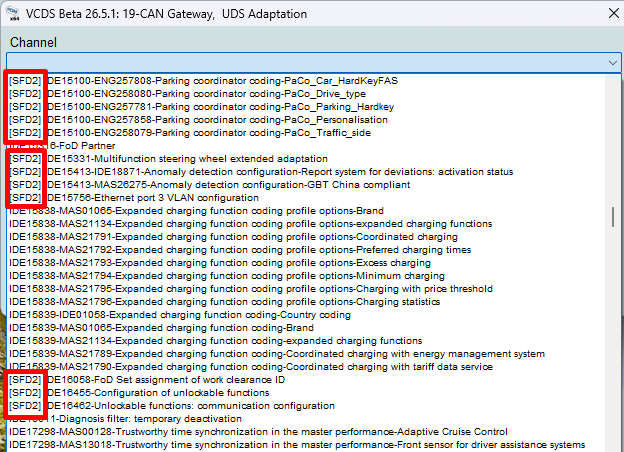
This means that the control unit is affected by SFD and SFD2.
Ross-Tech gives, for example, a Gateway with ” SFD+SFD2 ” displayed in the VCID.
❌ Can SFD2 be unlocked with an SFD token?
No.
That is a fundamental difference.
The token used for the classic SFD does not simply allow you to bypass SFD2.
SFD2 introduces additional mechanisms, and certain operations must be cryptographically signed.
That is precisely what makes retrofits and certain programming tasks much more difficult on the vehicles in question.
🛑 SFD2 and Retrofits
SFD2 can significantly limit certain retrofits.
For example, installing new equipment may require:
- encoding;
- an adaptation;
- a configuration;
- a program;
- a manufacturer’s authorization.
If the procedure requires a function protected by SFD2, simply using VCDS or OBDeleven may not be sufficient.
VCDS and SFD2
VCDS allows you to diagnose the affected vehicles and identify the active safety features.
However, SFD2 should not be viewed as a traditional SFD that can simply be unlocked with a token.
The inclusion of a VAGCOM HQ V2 STM32F405/429 ARM chip provides better compatibility with newer vehicles, but does not bypass the vehicle’s built-in security measures.
OBDeleven and SFD2
The situation is currently even more restrictive.
OBDeleven notes that as of 2026, VAG vehicles manufactured starting in 2024 with the new SFD2 security measures are not yet fully supported for advanced functions. Specifically, the app can communicate with the main gateway, but full access to other ECUs remains limited.
OBDeleven is always working to improve this compatibility.
⚠️ The situation may change with future updates to OBDeleven.
🆚 VAGCOM HQ V1, V2, and OBDeleven
| Function | HQ V1 ATMEGA162 | HQ V2 STM32F405/429 | OBDeleven |
|---|---|---|---|
| Classic Cars | 🟢 | 🟢 | 🟢 |
| MQB | 🟢 | 🟢 | 🟢 |
| MQB evo | 🔴 | 🟢 | 🟢 |
| SFD | 🔴 | 🟢* | 🟢 |
| SFD2 | 🔴 | ⚠️ Limited | 🔴/⚠️ |
| Conventional Diagnosis | 🟢 | 🟢 | 🟢 |
* Depending on the version of VCDS, the interface and the available authorization method may vary.
For OBDeleven, SFD2 compatibility must be checked carefully: the current official documentation indicates that the affected VAG 2024+ models are not yet fully supported.
📌 Example: Golf 7 and Golf 8
Under no circumstances should you automatically apply the coding from a Golf 7 to a Golf 8.
Golf 7
MQB
→ Older electronic architecture
→ Many encodings are directly accessible.
Golf 8
MQB evo
→ newer electronic architecture
→ SFD available on certain control units.
Newer Golf 8
→ Certain versions/computers may now be affected by SFD2.
The production date has therefore become particularly important.
⚠️ Before You Start Coding
Before modifying a recent VAG vehicle:
- Run a full Auto-Scan.
- Check the control module part number.
- Check the software version.
- Search for SFD and SFD2 in the VCID.
- Preserve the original encoding.
- Make sure the tutorial matches your vehicle exactly.
- Do not automatically apply a coding system from a different generation.
- Make sure your interface is compatible with the vehicle.
❓ Frequently Asked Questions About SFD and SFD2
What is SFD protection?
SFD is a protection mechanism implemented by the Volkswagen Group to prevent certain unauthorized modifications to the control modules. In particular, it can protect coding, adaptations, and certain diagnostic functions.
What is the difference between SFD and SFD2?
SFD2 is an evolution of SFD with additional security mechanisms. Certain functions protected by SFD2 require specific cryptographic authorization and cannot be unlocked with a standard SFD token.
How can I tell if my car has SFD?
Perform an Auto-Scan with VCDS and look for the entry “SFD” in the ECU information. The presence of “SFD” may vary from one ECU to another.
How can I tell if my car has SFD2?
In VCDS, some control modules may appear with the designation SFD+SFD2 in the VCID. This indicates that the control module is subject to both levels of protection.
What vehicles does SFD have?
SFD is primarily found in modern VAG vehicles, including certain Golf 8, Audi A3 8Y, Škoda Octavia 4, SEAT Leon KL, CUPRA Formentor, ID.3, and ID.4 models.
Which vehicles are equipped with SFD2?
SFD2 has gradually been introduced on newer VAG vehicles. It can be found in particular on certain Golf 8, Audi A3 8Y, Audi Q4, Audi Q7, Volkswagen Tiguan, Passat, Škoda Octavia, Enyaq, SEAT Leon, and CUPRA models, depending on the model year and the control module.
Does every Golf 8 come with SFD2?
No. The presence of SFD2 depends, among other things, on the model year, the control module, and its software version. Two Golf 8s may therefore have different safety features.
Does a Golf 7 have SFD2?
No, the Golf 7 is generally not affected by SFD2. SFD is primarily used in newer VAG models.
Can a car equipped with SFD be programmed?
Yes. You simply need to unlock the control unit when the function you’re using is protected by SFD.
Can you program a car equipped with SFD2 using VCDS?
Some operations are still possible, but SFD2 imposes additional restrictions. A standard SFD unlock alone does not provide access to all functions protected by SFD2.
Can SFD be deleted or disabled?
No. SFD is a safety feature built into the vehicle. Unlocking it only grants temporary authorization to perform certain operations.
Can we remove SFD2?
No. SFD2 cannot be permanently disabled using VCDS or OBDeleven.
Can an SFD token be used to unlock SFD2?
No. A token intended for the classic SFD cannot be used to bypass the additional protections in SFD2.
What is the difference between an SFD token and an SFD Online token?
With an SFD token, the process involves retrieving a request from the ECU and then obtaining a response that enables unlocking.
With SFD Online, the authorization request is submitted directly through the VCDS-compatible online service.
Is the SFD unlock permanent?
No. The unlock is temporary. Once authorization is complete, the control unit returns to its protected state.
Does SFD prevent fault codes from being read?
No. SFD is primarily intended for modification operations. Error codes and a wide range of diagnostic information generally remain accessible.
Does SFD block VCDS modifications?
Some adaptations, yes. If the adjustment is protected, the control unit must be unlocked before it can be modified.
Does SFD block all encodings?
No. Only protected functions are affected. A vehicle can therefore accept certain codes without unlocking and block others.
Why does my VCDS programming work on a Golf 7 but not on a Golf 8?
The two vehicles do not use exactly the same electronic architecture. In particular, the Golf 8 uses an MQB evo architecture, and some control modules are protected by SFD.
A code intended for a Golf 7 should therefore not be automatically applied to a Golf 8.
Does VAGCOM HQ V1 ATMEGA162 work with SFD?
No. This generation of interface is not compatible with the SFD functions of newer vehicles.
Does VAGCOM HQ V2 STM32F405/429 work with SFD?
Yes, communication with compatible vehicles is possible, but access to protected functions then depends on VCDS and the available authorization method.
Can OBDeleven unlock SFD?
Yes, OBDeleven supports SFD on many compatible vehicles.
Can OBDeleven unlock SFD2?
Support for SFD2 is much more limited. You must verify that the vehicle, the ECU, and the feature are compatible with the current version of OBDeleven.
Why are some calculators accessible while others display “SFD”?
Because SFD is applied at the ECU level and not necessarily to the entire vehicle.
It is therefore normal for a single vehicle to have multiple control modules with different levels of protection.
What does “SFD+SFD2” mean in VCDS?
This indication means that the control unit is affected by SFD and SFD2. Protected functions may therefore require additional permissions.
What does “-R” mean in a VCDS Auto-Scan?
The -R flag may indicate that a control unit is subject to a Diagnostic Filter or Diagnostic Firewall, which may restrict access to it from an independent diagnostic tool.
Does SFD2 prevent retrofits?
Some retrofits may be severely limited. If the installation requires an adjustment, configuration, or a function protected by SFD2, a simple modification using VCDS or OBDeleven may not be sufficient.
Why does my tool communicate with the car but refuse to perform the coding?
Communication with the computer and authorization to make changes are two different things.
An ECU may be fully accessible for diagnostics but may refuse a write operation due to SFD, SFD2, or another form of protection.
Conclusion
VAG vehicle protection has evolved significantly.
There are now several levels of protection available:
SFD → SFD2 → Diagnostic Filter / Firewall
The standard SFD can be temporarily unlocked, including through a procedure that uses a token or compatible online solutions.
SFD2 is much more restrictive. Certain functions must be cryptographically authorized by the manufacturer, and consumer diagnostic tools cannot simply bypass this protection.
SFD2 has become particularly common in VAG vehicles produced starting in 2023/2024, depending on the model and the control module. The list of models is updated regularly.
Key point: SFD and SFD2 cannot be disabled. SFD can be temporarily unlocked when the feature is supported, while SFD2 imposes additional restrictions.
When programming your vehicle, always use a tutorial that exactly matches your vehicle’s model, generation, year, and ECU.
🔗 Related VAG Coding Tutorials
To find the coding procedures specific to your vehicle, see the VCDS and OBDeleven tutorials from VAG Coding.
Note: Always choose a tutorial that matches your model and its generation exactly.
Related Tutorials
-> VCDS vs. OBDeleven Comparison
-> List of OBDeleven One-Click Apps
-> VCDS: Resetting Tire Pressure
-> VAG Platforms

