

Purpose: Allows you to disable the brake pad wear warning light on the OBD (On-Board Diagnostics) system, for example, for brake pads without a sensor or if the sensor is malfunctioning / Brake Pad Warning Light Deactivation.
Proceed :
1 – Engine off, ignition off, connect your official VAG-COM VCDS cable to the computer, then plug the other end into your vehicle’s diagnostics socket.
2 – Switch on the ignition and run the VCDS program.
Line 1:
3 – Click “ Select,” then click “ 17 – Instruments.”
4 – Click on “Coding – 07”.
The third and fourth coding digits (xx??x0x) are used to modify Instrument module options. To suppress the brake pad indicatorsubtract 1 from these digits.
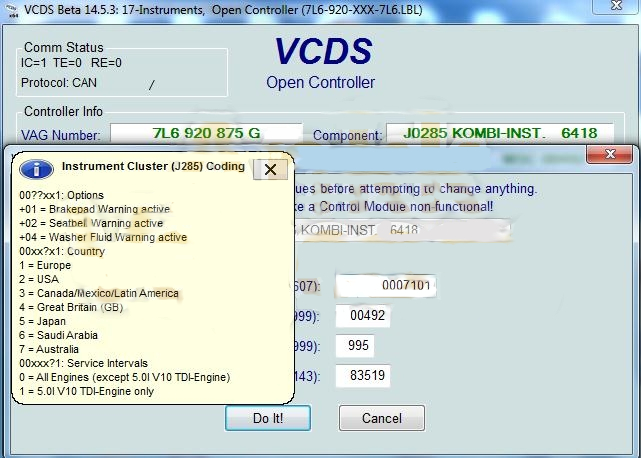
For example, if the initial coding (with the wafer indicator) is:0007101
To delete the indicator plate, simply recode as follows:0006101(07 – 01 = 06)

This post is also available in:
 Français (French)
