

Purpose : to configure brake assist.
Procedure :
1 – Engine off, ignition off, connect your official VAG-COM VCDS cable to the computer, then plug the other end into your vehicle’s diagnostics socket.
2 – Switch on the ignition and run the VCDS program.
Line 1 :
3 – Click on“Select”, then click on“03 – ABS”.
4 – Click “Adaptation – 10.”
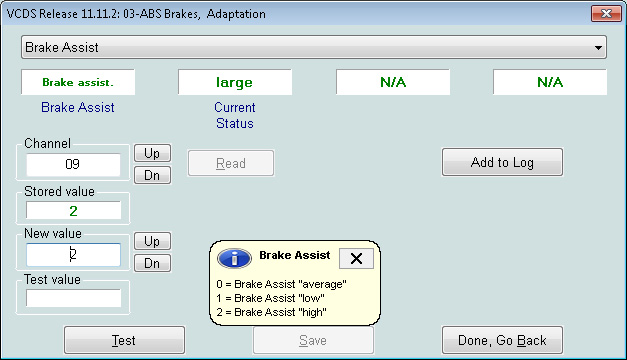
5 – Select Channel 09 (Brake Assist from the drop-down list)
Choose a value
0 “medium”
1 “low” (with low assistance, the brake pedal will be harder and you will have to press harder to brake)
2 “strong” (with strong assistance, the brake pedal will be softer and less pressure will be required to brake)
This post is also available in:
 Français (French)
