Purpose: Allows you to use the fog lights as daytime running lights. (For Phases 1 and 2)
Procedure:
1 – Engine off, ignition off, connect your official VAG-COM VCDS cable to the computer, then plug the other end into your vehicle’s diagnostics socket.
2 – Switch on the ignition and run the VCDS program.
Tiguan 5N Phase 1:
Line 1:
3 – Click “ Select,” then click “ 09 – Cent. Elect.”
4 – Click on “ Code 07.”
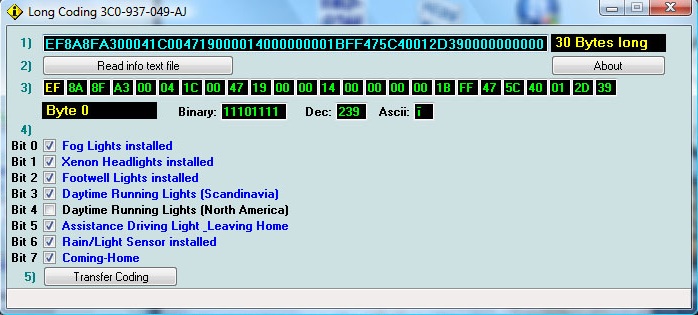
5 – Select module “0” and click “Long Coding Helper”:
6 – Byte 0:
Bit 4: Check “Daytime Running Lights (North America)”
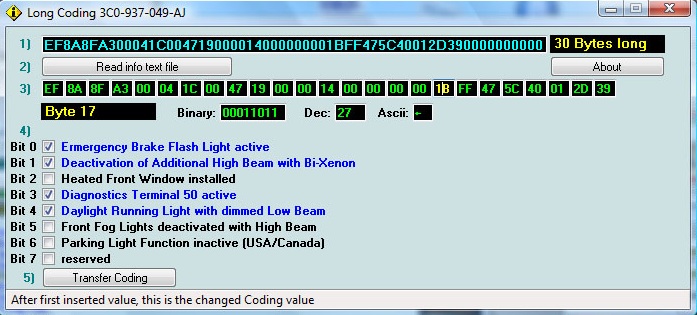
7 – Byte 17:
Bit 4: Check “Daytime Running Light with dimmed Low Beam” (or “Daytime Running Light via Fog Lights,” depending on your version of VCDS)
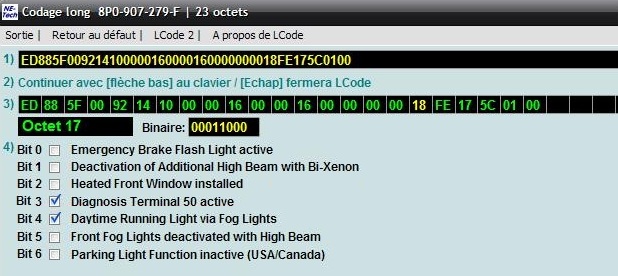
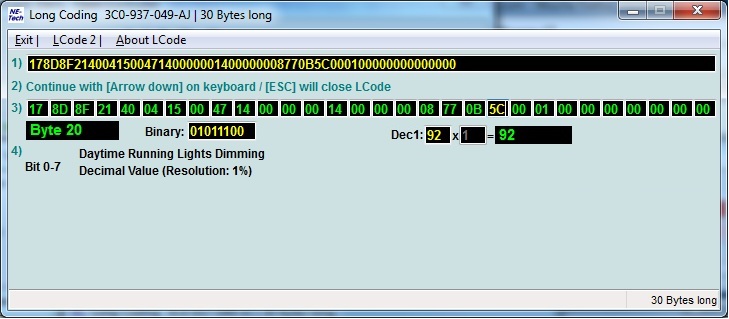
8- Adjusting the fog light intensity (from 1% to 99%)
Byte 20:
Change the value in the Dec box
Tiguan 5N2 Facelift :
Line 1:
3 – Click “ Select,” then click “ 09 – Cent. Elect.”
4 – Click on “ Code 07.”
5 – Select module “0” and click “Long Coding Helper”:
6 – Byte 14:
Check Bit 1 ” Daytime Running Lights (DRL) via Fogs Active“

This post is also available in:
 Français (French)
