Purpose: Enables the “Ambient Lighting” menu on the MIB2 Discover. Display of ambient lighting zones; allows you to adjust the brightness of the ambient lighting via the interior display and by zone (floor lighting, door lighting, etc.)

Procedure:
1 – With the engine off and the ignition off, connect your official VAG-COM VCDS cable to the computer, then plug the other end into your vehicle’s diagnostic port.
2 – Turn on the ignition, then launch the VCDS program.
Line 1:
3 – Click “Select,” then click “09 – Power Control Unit.”
4 – Click on“Security Access – 16” then enter the code“31347”.
5 – Click on“Adaptation – 10”.
6 – On this page, at the very top, there is a drop-down menu.
In this drop-down menu, choose the channel corresponding to activate the “Ambient lighting” menu in the MIB parameters:
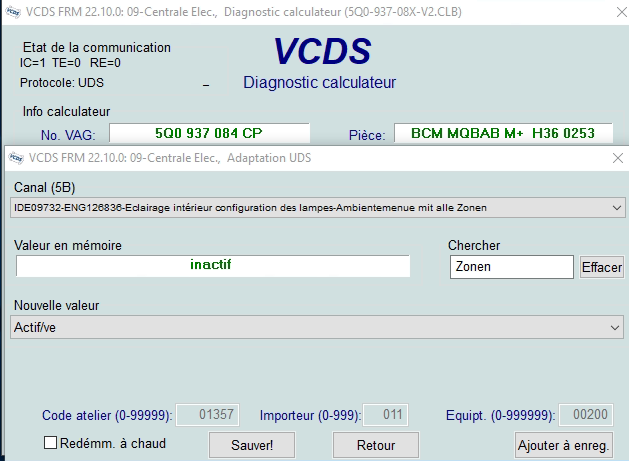
Channel:“Interior light: light configuration-Ambientemenue mit alle Zonen” (Interior light: light configuration-Ambientemenue with all zones)
7 – On the same page, there’s a second drop-down menu at the bottom
of the page.
Select“active” and confirm.
Line 2:
3 – Click on“Select”, then click on“09 – Cent. Elect.”.
4 – Click on“Security Access – 16” then enter the code“31347”.
5 – Click “Adaptation – 10.”
6 – On this page, at the very top, there is a drop-down menu.
In this drop-down menu, choose the channel corresponding to activate the menu stop:
Channel:“Interior light: light configuration-Ambientemenue mit globalem aus”
7 – On the same page, you’ll find a second drop-down menu at the bottom
of the page.
On this menu, select“active” and confirm.
Line 3 (optional) :
For pre-facelift vehicles (Phase 1), if the “Backlighting” menu does not display an image, you can try changing the vehicle configuration to the facelift model and see if that works.
3 – Click on“Select” then click on“5F – Electr. information”.
4 – Click on “Coding – 07” then click on“Long Coding Helper”
5 – Choose byte“02”
Then check Bit 04 “Car Derivate Supplement”.
OBDeleven : Byte 2 Car Derivate Supplement on 1
Restart MIB

This post is also available in:
 Français (French)
