
Purpose: Enables US parking lights to turn on with the turn signals.
Watch out! There are 10 lines of coding to do here. (Golf 7 Phase 1 only)
Proceed :
1 – Engine off, ignition off, connect your official VAG-COM VCDS cable to the computer, then plug the other end into your vehicle’s diagnostics socket.
2 – Switch on the ignition and run the VCDS program.
Line 1:
3 – Click on“Select”, then click on“09 – Cent. Elect.”.
4 – Click on“Security Access – 16” then enter the code“31347”.
5 – Click on“Adaptation – 10”.
6 – At the very top of this page, there is a drop-down menu.
From this drop-down menu, select “Leuchte 0 BLK VL B36-Lichtfunktion C 0.”
7 – On this same page, there is a second drop-down menu further down
.
From this menu, select “Standlicht allgemein (Schlusslicht; Positionslicht; Begrenzungslicht)” and then confirm. (Default: inactive or Blinken links Dunkelphase)
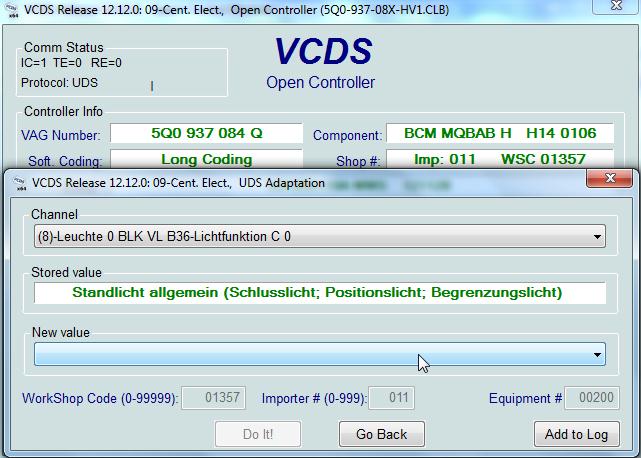
Line 2:
3 – Click on“Select”, then click on“09 – Cent. Elect.”.
4 – Click on“Security Access – 16” then enter the code“31347”.
5 – Click on“Adaptation – 10”.
6 – At the very top of this page, there is a drop-down menu.
From this drop-down menu, select “Leuchte1BLK VRB20-Lichtfunktion C 1“
7 – On this same page there is a second drop-down menu, but towards the bottom
of the page.
On the latter, choose “ Standlicht allgemein (Schlusslicht; Positionslicht; Begrenzungslicht) ” then validate. (Origin: inactive or Blinken rechts Dunkelphase )
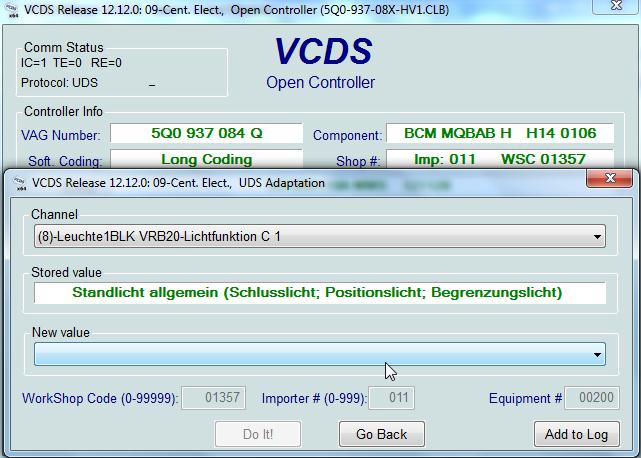
Line 3: (Option: US pilot lights on position 0)
3 – Click on“Select”, then click on“09 – Cent. Elect.”.
4 – Click on“Security Access – 16” then enter the code“31347”.
5 – Click on“Adaptation – 10”.
6 – At the very top of this page, there is a drop-down menu.
From this drop-down menu, select “Leuchte 0 BLK VL B36-Lichtfunktion D 0“
7 – On this same page, there is a second drop-down menu located toward the bottom
of the page.
From this menu, select “Daytime running lights” and then confirm. (Default: off)
Line 4: (Option: US parking lights in position 0)
3 – Click on“Select”, then click on“09 – Cent. Elect.”.
4 – Click on“Security Access – 16” then enter the code“31347”.
5 – Click on“Adaptation – 10”.
6 – At the very top of this page, there is a drop-down menu.
From this drop-down menu, select “Leuchte1BLK VRB20-Lichtfunktion D 1“
7 – On this same page, there is a second drop-down menu located toward the bottom
of the page.
From this menu, select “Daytime running lights” and then confirm. (Default: off)
Line 5:
3 – Click on“Select”, then click on“09 – Cent. Elect.”.
4 – Click on“Security Access – 16” then enter the code“31347”.
5 – Click on“Adaptation – 10”.
6 – At the very top of this page, there is a drop-down menu.
From this drop-down menu, select “Leuchte 0 BLK VL B36-Dimmwert CD 0“
7 – On this same page, there is a second drop-down menu located toward the bottom
of the page.
From this menu, select either “0” or “100” and then confirm. (Headlight brightness between 0 and 100%) (Default: 0)
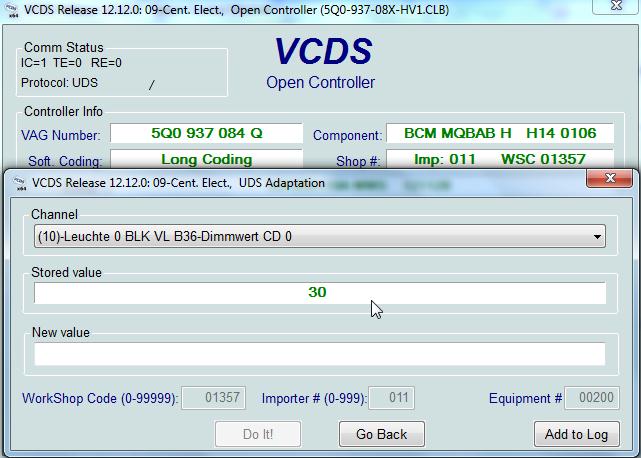
Line 6:
3 – Click on“Select”, then click on“09 – Cent. Elect.”.
4 – Click on“Security Access – 16” then enter the code“31347”.
5 – Click on“Adaptation – 10”.
6 – At the very top of this page, there is a drop-down menu.
From this drop-down menu, select “Leuchte1BLK VRB20-Dimmwert CD 1“
7 – On this same page, there is a second drop-down menu located toward the bottom
of the page.
From this menu, select either “0” or “100” and then confirm. (Headlight brightness between 0 and 100%) (Default: 0)
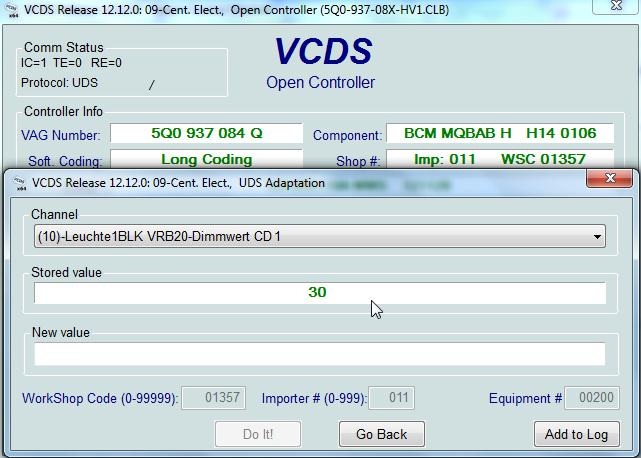
Line 7:
3 – Click on“Select”, then click on“09 – Cent. Elect.”.
4 – Click on“Security Access – 16” then enter the code“31347”.
5 – Click on“Adaptation – 10”.
6 – At the very top of this page, there is a drop-down menu.
From this drop-down menu, select “Leuchte 0 BLK VL B36-Lichtfunktion E 0“
7 – On this same page, there is a second drop-down menu located toward the bottom
of the page.
From this menu, select “Blinken links Dunkelphase” and then confirm. (Source: inactive)
Line 8:
3 – Click on“Select”, then click on“09 – Cent. Elect.”.
4 – Click on“Security Access – 16” then enter the code“31347”.
5 – Click on“Adaptation – 10”.
6 – At the very top of this page, there is a drop-down menu.
From this drop-down menu, select “Leuchte1BLK VRB20-Lichtfunktion E 1“
7 – On this same page, there is a second drop-down menu further down
.
From this menu, select “Blinken rechts Dunkelphase” and then confirm. (Source: inactive)
Line 9:
3 – Click on“Select”, then click on“09 – Cent. Elect.”.
4 – Click on“Security Access – 16” then enter the code“31347”.
5 – Click on“Adaptation – 10”.
6 – At the very top of this page, there is a drop-down menu.
From this drop-down menu, select “Leuchte 0 BLK VL B36-Dimming Direction EF 0“
7 – Sur cette même page se trouve un deuxième menu déroulant mais vers le bas
de la page.
Sur ce dernier, choisir “minimize” puis valider. (Origine : maximize)
Line 10:
3 – Click on“Select”, then click on“09 – Cent. Elect.”.
4 – Click on“Security Access – 16” then enter the code“31347”.
5 – Click on“Adaptation – 10”.
6 – At the very top of this page, there is a drop-down menu.
From this drop-down menu, select “Leuchte1BLK VRB20-Dimming Direction EF 1“
7 – Sur cette même page se trouve un deuxième menu déroulant mais vers le bas
de la page.
Sur ce dernier, choisir “minimize” puis valider. (Origine : maximize)
This post is also available in:
 Français (French)
