
Purpose: Enables the LED taillights (Golf 6 GTI/R style) to be activated after replacing the original halogen taillights with LED taillights (retrofit).
Procedure:
1 – With the engine off and the ignition turned off, connect your official VAG-COM VCDS cable to the computer, then plug the other end into your vehicle’s diagnostic port.
2 – Turn on the ignition, then launch the VCDS program.
Line 1:
3 – Click on“Select”, then click on“09 – Cent. Elect.”.
4 – Click on“Coding 07”.
5 – Select the “0” module and click on “Long Coding Helper”:
For byte 18, set the value to 00100; this will set the hexadecimal value in the line above to 04.
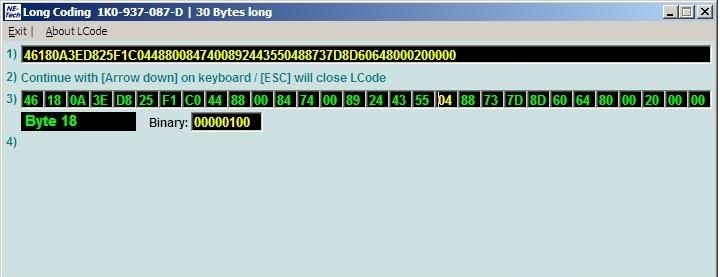
For 2009 models (Power Plant Version 03xx)
| VCDS Coding | Byte 18 = 04 |
|---|---|
| Interior lights turn off when the trunk is opened | NO |
| ODB Error | rear fog light (it will work fine if you add a resistor) |
For 2010 models, starting in week 22 of 2009 (Power Plant Version 0537, 0541)
| VCDS Coding | Byte 18 = 15 | Xenon Byte 18 = 43 |
|---|---|---|
| Interior lights turn off when the trunk is opened | NO | Power plant update required for version 0575/6 * |
| ODB Error | NO | Power plant update required for version 0575/6 * |
* If your vehicle is equipped with xenon headlights, you must update the power control unit to version 0575/6; otherwise, the daytime running lights (DRL) will no longer work.
For 2010/2011 models, starting in week 45 of 2009 (Power Plant versions 0573, 0575, 0576)
| VCDS Coding | Byte 18 = 15 | Xenon Byte 18 = 43 |
|---|---|---|
| Interior lights turn off when the trunk is opened | YES | YES |
| ODB Error | NO | NO |
Test your new LED lights to make sure everything is working properly.
This post is also available in:
 Français (French)
