

Purpose: Allows you to disable the brake pad wear warning light on the OBD (On-Board Computer), for example, for brake pads without a sensor or if the sensor is malfunctioning / Brake Pad Warning Light Deactivation.
Proceed :
1 – Engine off, ignition off, connect your official VAG-COM VCDS cable to the computer, then plug the other end into your vehicle’s diagnostics socket.
2 – Switch on the ignition and run the VCDS program.
Line 1:
3 – Click “ Select,” then click “ 17 – Instruments.”
4 – Click on “Coding – 07”
The first two digits of the code (??xxxx) are used to modify the Instrument module options. To remove the brake pad indicator, subtract 01 from these digits.
Example of initial coding (with nameplate indicator): 05142
To remove the indicator plate, simply recode as follows: 04142 (05 – 01 = 04)
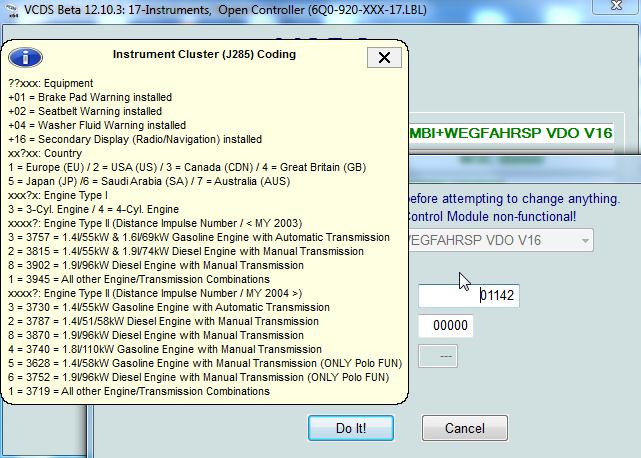
To activate the brake pad indicator: +01

This post is also available in:
 Français (French)
