Purpose: Allows you to disable ESP and/or enable Sport ESC mode from the screen. (For Leon Phase 1)
Proceed :
1 – Engine off, ignition off, connect your official VAG-COM VCDS cable to the computer, then plug the other end into your vehicle’s diagnostics socket.
2 – Switch on the ignition and run the VCDS program.
Line 1:
3 – Click on“Select”, then click on“03- ABS Brakes”.
4 – Click on“Codage- 07” then“Long Coding Helper”.
5 – Click on byte“29”.
6 – There is no checkbox; you must directly change the byte value in its field!
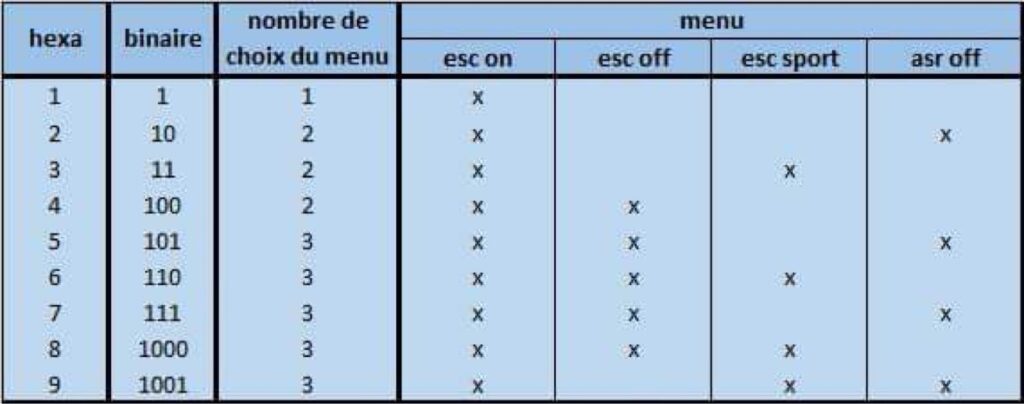
To do this, replace “02” with “06,” “07,” or “09,” depending on your vehicle
For further information:
“02” = (ESC On / ASR Off)
“06” = (ESC/ESP On / ESC Sport / ESC Off)
“07” = (ESC/ESP On / ASR Off / ESC Off)
“09” = (ESC/ESP On / ASR Off / ESC Sport)