

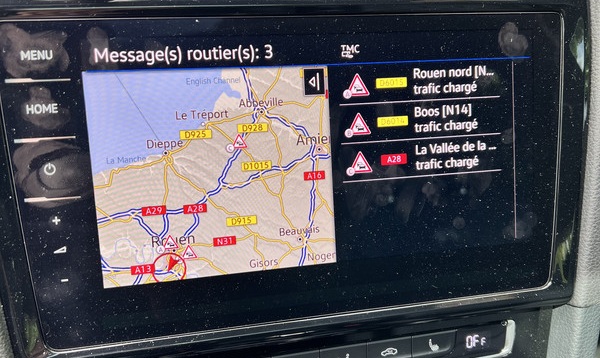
Purpose: Allows you to enable or re-enable the TMC feature on MIB PRO devices. Since 2022, the TMC feature for navigation map updates in France is no longer available on MIB2 MEDIA (MST2) units, but it can be reactivated on MIB2 PRO (MHI2) units.
Traffic Message Channel (TMC) is a technology used to transmit information about traffic jams and adverse road conditions.
The data is transmitted in the form of numerical codes using a radio notification system (FM-RDS) for conventional FM receivers.
Support for TMC functions allows the vehicle’s navigation system to receive information about areas with traffic incidents and to calculate an alternative route to avoid problem areas.
Warning! There are 2 lines of coding to do here.
Proceed :
1 – Engine off, ignition off, connect your official VAG-COM VCDS cable to the computer, then plug the other end into your vehicle’s diagnostics socket.
2 – Switch on the ignition and run the VCDS program.
Line 1:
3 – Click on“Select” then click on“5F – Electr. information”.
4 – Click on “Coding – 07”.
5 – Click on “Long Coding Helper” .
6 – Select Byte 13
Set bit 03 “Radio Text Plus (RT+) enabled [STANDARD]”
Line 2:
3 – Click on“Select” then click on“5F – Electr. information”.
4 – Click on“Security Access – 16” then enter the code“20103”.
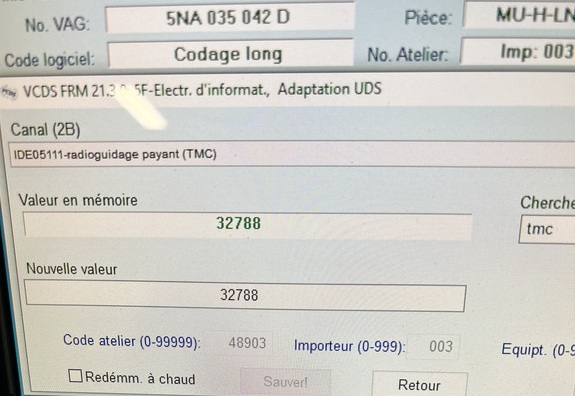
5 – Click on“Adaptation – 10”.
6 – At the very top of this page, there is a drop-down menu.
From this drop-down menu, select “Fee-based traffic information (TMC)” / “Radioguidage payant (TMC)“
7 – In “Value in Memory,” select a new value:
- 3 (VW TMCPro MIB1)
- 1024 (Suna/Australia)
- 1537 (Canada)
- 32768 (VW TMCPro MIB2)
- 32771 (online traffic + VW TMCpro)
- 32773 / 32780 / 32782 / 32788 are compatible with the European MIB2PRO
This post is also available in:
 Français (French)
