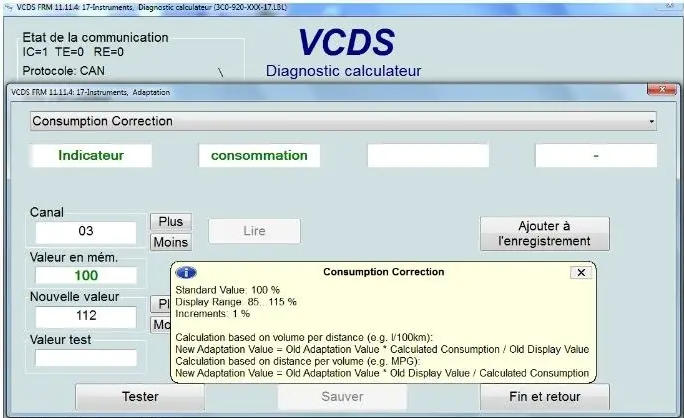
Purpose: Allows you to correct the fuel consumption display on the onboard computer.
This setting can only be changed on mid-range and high-end models.
Note: Changes made to this setting affect the display of instantaneous fuel consumption, average fuel consumption, and fuel level.
Procedure:
1 – Engine off, ignition off, connect your official VAG-COM VCDS cable to the computer, then plug the other end into your vehicle’s diagnostics socket.
2 – Switch on the ignition and run the VCDS program.
Line 1:
3 – Click “ Select,” then click “17 – Instruments.”
4 – Click “Adaptation – 10.”
5 – Select Channel 03 “Consumption Correction”
Set the consumption correction factor between 85% and 115% (base value: 100)
Example 1: Calculation based on volume per distance (e.g., l/100 km): Specified: 9.3 l/100 km. Actual: 9.8 l/100 km. (100, 9.8 / 9.73 ? 105.38) Channel 3 will be changed from 100 to 105
Example 2: Calculation based on distance per volume (e.g., MPG): Target: 23 MPG. Actual: 24 MPG. (100, 23/24, and 95.83) Channel 3 will be changed from 100 to 96