

Purpose: for convenient adjustment of ACC distance setting via MMI.
Procedure:
1 – Engine off, ignition off, connect your official VAG-COM VCDS cable to the computer, then plug the other end into your vehicle’s diagnostics socket.
2 – Switch on the ignition and run the VCDS program.
Line 1:
3 – Click on ” Select ” and then click on “Select”.13 – Regul Dist.” .
4 – Click on “Security Access – 16” then enter the code “14117”.
5 – Click on “Adaptation – 10”.
6 – Select Channel :“Distance basic setting” or “Distanzgrundeinstellung”
7 – Set value to 1 to activate.
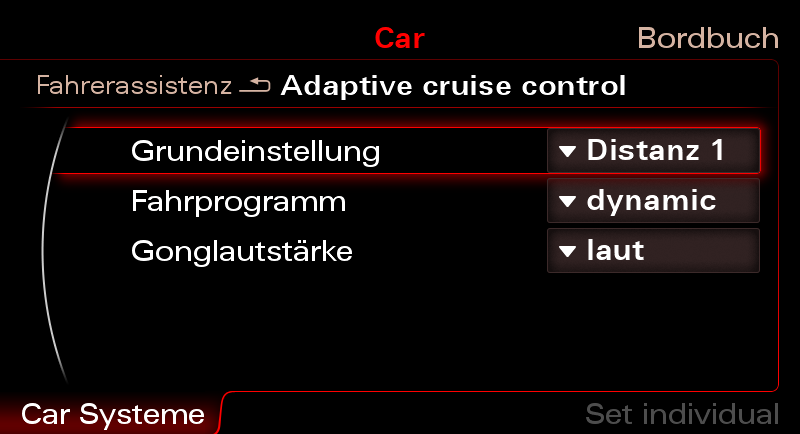
- After activation, press the “car” button in the MMI, select the driving assistance zone – “adaptive cruise control” tab.
- Here you can now specify the respective distance setting under “Distance”:
Distance 1 – large distance, i.e. early braking by the ACC distance system
Distance 2 – small distance, i.e. normal to early braking by the ACC distance system
Distance 3 – small distance, i.e. normal to late braking by the ACC distance system
Distance 4 – smallest distance, i.e. late braking by the ACC distance system; if a vehicle stops in front of you on the freeway and cuts you off, the system will not react as abruptly if there is still enough distance.

This post is also available in:
 Français (French)
