

Purpose: Enables the automatic parking brake feature. When the vehicle is parked, the parking brake is automatically engaged, so you no longer need to apply it manually.
Procedure:
1 – Engine off, ignition off, connect your official VAG-COM VCDS cable to the computer, then plug the other end into your vehicle’s diagnostics socket.
2 – Switch on the ignition and run the VCDS program.
Line 1:
3 – Click “Select,” then click “03 – Brake.”
4 – Click on “Security Access – 16” then enter the code “40168”
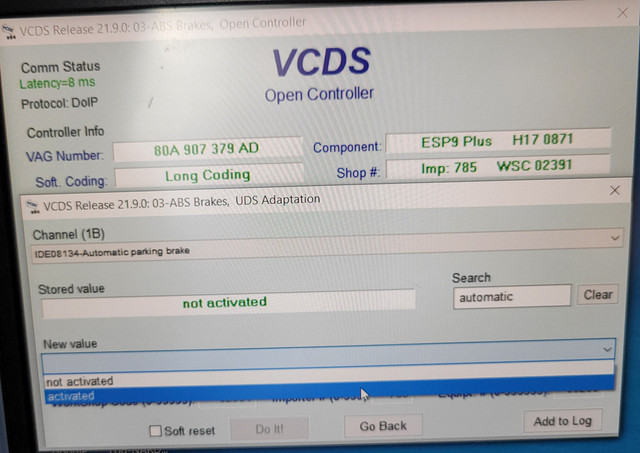
5 – Click on“Adaptation – 10”
6 – Select Channel : ” Automatic parking brake” or “Automatische Parkbremse“ , or “Automatic parking brake”
Set value to“Active
This post is also available in:
 Français (French)
