

Purpose: Enables the installation of a retrofit trailer hitch (trailer/towbar retrofit).
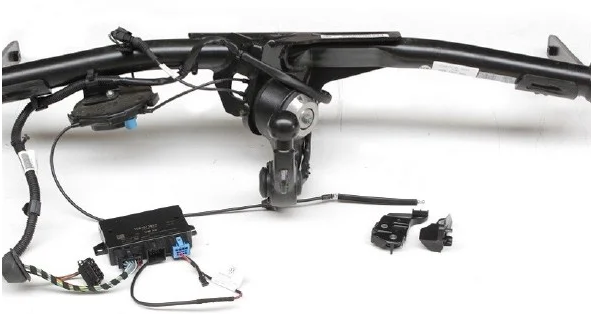
Warning!! Depending on the modules you have installed, there are up to 9 coding lines to complete here; most control units require a long coding process with a “trailer” that must be enabled!
SFD: yes
Proceed :
1 – Engine off, ignition off, connect your official VAG-COM VCDS cable to the computer, then plug the other end into your vehicle’s diagnostic socket or OBDeleven box.
2 – Switch on the ignition and run the VCDS program.
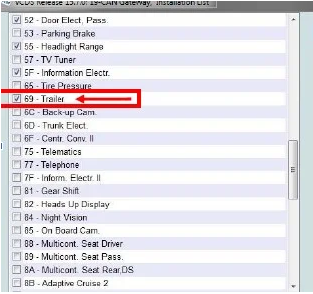
Line 1:
3 – Click “Select,” then click “19 – CAN Gateway.”
4 – Select “Installation List”
5 – Check “69 – Trailer” in the list
6 – Save coding
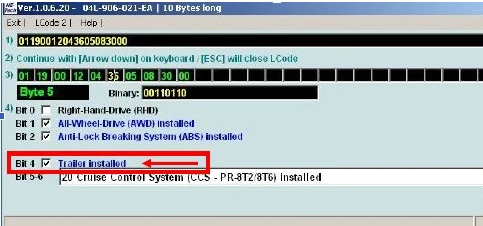
Line 2:
3 – Click on“Select”, then click on“01 – Motor“.
4 – Click on ” Coding – 07” then click on“Long Coding Helper“.
5 – Select byte “05“
. Then check bit “4“: “Trailer installed“
Line 3:
3 – Click “Select,” then click ““09 – Cent. Elect.”“.
4 – Unlock SFD protection
5 – Click on“Adaptation – 10”.
6 – At the very top of this page, there is a drop-down menu.
From this drop-down menu, select “Vernetzung – Anhaengeranschlussgeraet“
7 – On this same page, there is a second drop-down menu toward the bottom
.
From this menu, select “installed” and then confirm.
Line 4:
3 – Click on“Select” then click on“03 – ABS brake“.
4 – Unlock SFD protection
5 – Click on“Adaptation – 10”.
6 – At the very top of this page, there is a drop-down menu.
From this drop-down menu, select “Gespannstabilisierung.”
7 – On this same page, there is a second drop-down menu located toward the bottom
.
From this menu, select “Active” and then confirm.
Line 5:
3 – Click on“Select” then click on “.13 – Auto Dist. Reg. “.
4 – Unlock SFD protection
5 – Click ” Encoding – 07,” then click “Long Coding Helper“
6 – Select byte “01“
Then check Bit 7 “Control_module_for_towing_sensor”
Line 6:
3 – Click “Select,” then click “3C – Lane Change.”
4 – Click on ” Coding – 07” then click on“Long Coding Helper“.
5 – Select the “00” byte
Then check Bit 5 “ECU for drawbar, with ECU for drawbar”
Line 7:
3 – Click “Select,” then click “6C – Rearview Camera.”
4 – Click on ” Coding – 07” then click on“Long Coding Helper“.
5 – Select byte “02“
Then set bit 0 (“equipment_ahk, installed”)
Line 8:
3 – Click on“Select” then click on “.A5 – Front, Sensors, Driver Assistance “.
4 – Unlock SFD protection
5 – Click ” Encoding – 07,” then click “Long Coding Helper“
Select byte “05“
Then set bit 4 (“AAG, 0 = not_coded / 1 = coded”)
Line 9:
3 – Click “Select,” then click “69 – Trailer“.
4 – Click on ” Coding – 07” then click on“Long Coding Helper“.
5 – Select byte “01“
Then check bits 0-7 “01 – Trailer Connector Diagnostics active”
Select byte “03“
Then check bits 0-7 “01 – Trailer Connector Diagnostics active”
This post is also available in:
 Français (French)
