

Purpose: Enables Audi Hill Start Assist.
Caution: Do not confuse this with Audi Hold Assist, which keeps the vehicle stationary on uphill and downhill slopes for as long as desired. If the vehicle remains stationary for an extended period, the system automatically switches to the electromechanical brake. Audi Hold Assist requires the following button (see image) to activate and deactivate it.
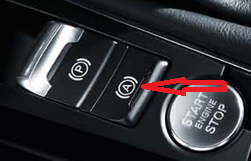
Audi Hill Start Assist is a hill-start assist feature. If you hold down the brake pedal for a certain amount of time while the vehicle is stopped, brake pressure is maintained for a few seconds after you release the brake pedal, making it easier to start on a hill.
Proceed :
1 – Engine off, ignition off, connect your official VAG-COM VCDS cable to the computer, then plug the other end into your vehicle’s diagnostics socket.
2 – Switch on the ignition and run the VCDS program.
Line 1:
3 – Click on“Select”, then click on“03 – ABSBrakes ”.
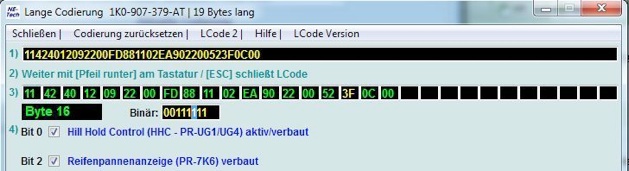
4 – Click on“Codage- 07” then“Long Coding Helper”.
5 – Select Byte 16:
Bit 0: Check “Hill Hold Control (HHC/PR-UG1/UG4) active/installed”
Line 2:
3 – Click on“Select”, then click on“03 – ABSBrakes ”.
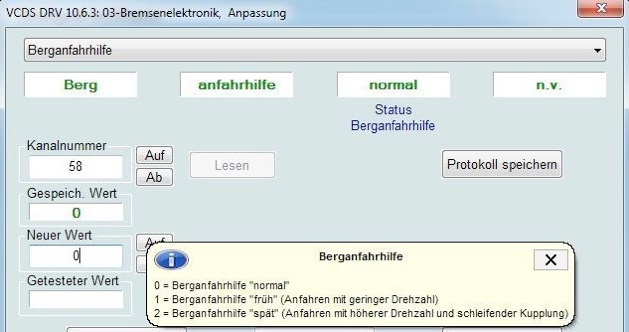
4 – Click “Adaptation – 10.”
5 – At the very top of this page, there is a drop-down menu.
From this drop-down menu, select “Channel 58 Hill Hold Control.”
6 – On this same page, there is a second drop-down menu located toward the bottom
.
From this menu, select the value based on your preference:
Change the value to 0, 1, or 2
0: “Normal” Hill Hold Control (HHC)
1: “Early” Hill Hold Control (HHC) (the vehicle starts moving with less acceleration)
2: “Late” Hill Hold Control (HHC) (the vehicle starts moving with more acceleration)
then click “Submit.”
This post is also available in:
 Français (French)
