
Purpose: to activate closing and opening of the windows and sunroof with the remote control WITHOUT remaining pressed until the windows are completely closed.
Procedure:
1 – With the engine off and the ignition off, connect your official VAG-COM VCDS cable to the computer, then connect the other end to your vehicle’s diagnostic port.
2 – Turn on the ignition, then launch the VCDS program.
Line 1 (With 46 – Central Conv):
3 – Click “Select,” then click “46 – Central Conv.”
4 – Click “Encoding 07,” then “Long Coding Helper”
5 – Byte 6:
Bit 6: Check “Comfort Function automatic Closing”.
- Uncheck “Comfort function power windows/sunroof via remote control inactive”.
- Check “Comfort opening power windows via remote control active”.
- Check “Comfort closing power windows via remote control active”.
- Check “Closing sunroof via remote control active” (sunroof)
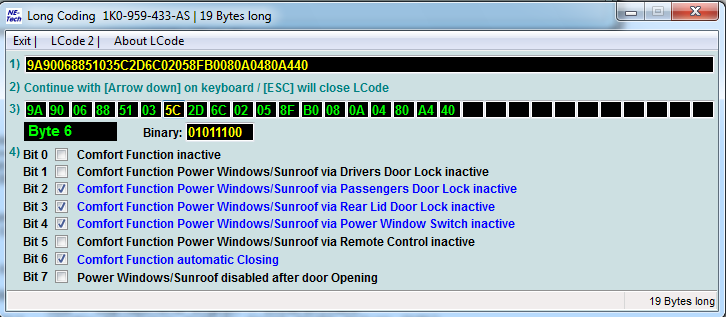
Pressing the remote control’s close button for 3 seconds will first lock the doors and then close the windows, without having to keep the button pressed until they are fully closed.
Line 1 (Excluding 46 – Central Conv):
3 – Click “Select,” then click “ 09 – Cent. Elect. “.
4 – Click “Encoding 07,” then “Long Coding Helper”
5 – Byte 3:
Bit 5: Check “Comfort Operation via Remote Control Active”.
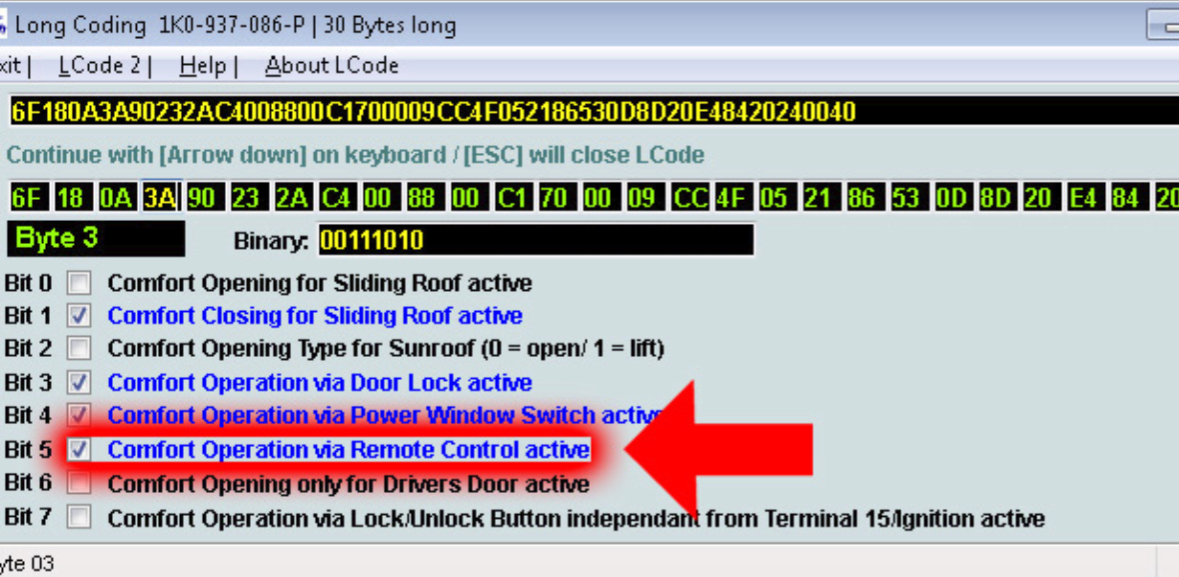
Bit 0 – Comfort Opening for Sliding Roof Active will also open the sunroof while opening the windows by remote control.
This post is also available in:
 Français (French)
