

Purpose: Enables the rearview camera after it has been installed on the RCD 510/330/360/440 and RNS 315/510 (retrofit).
Proceed :
1 – Engine off, ignition off, connect your official VAG-COM VCDS cable to the computer, then plug the other end into your vehicle’s diagnostics socket.
2 – Switch on the ignition and run the VCDS program.
Line 1:
3 – Click “Select,” then click “37 – Navigation ” (RNS) or “56 – Radio” (RCD)
4 – Click on“Coding – 07” then click on“Long Coding Helper“.
5 – Select byte 3
. Then set bit 6 to “Rear View Camera (RVC) installed/active.”
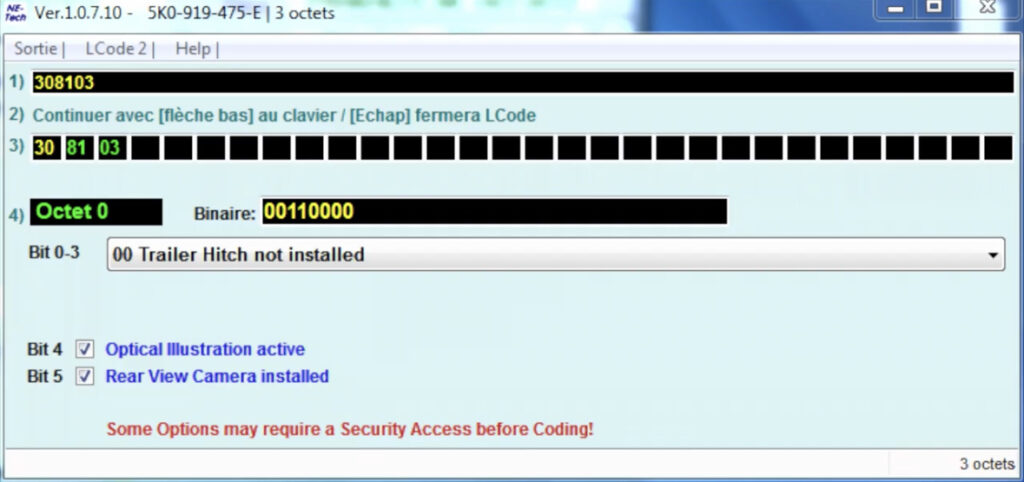
Line 2 (Optional, if parking assist is available) :
3 – Click “Select,” then click “10 – Parking Assistance.”
4 – Click on“Coding – 07” then click on“Long Coding Helper“.
5 – Select byte 0
. Then set bit 5 to “Rear View Camera installed.”
Hardware upgrade :
The camera’s video cable is connected to the infotainment control unit. It is installed in the glovebox.
The two pins from the backup camera are used in the 12-pin Quadlock connector (blue).
Quadblock Assignment :
Pin 6 = video line
Pin 12 = shielding
This post is also available in:
 Français (French)
