

Purpose : Used to set up selective door unlocking.
When unlocking the vehicle, only the driver’s door is unlocked. To unlock all doors, press the remote control’s unlock button twice.
Procedure:
1 – Engine off, ignition off, connect your official VAG-COM VCDS cable to the computer, then plug the other end into your vehicle’s diagnostics socket.
2 – Switch on the ignition and run the VCDS program.
Line 1 (AFTER the end of 2009) :
3 – Click “Select,” then click “09 – Power Plant.“
4 – Click “Encoding – 07,” then “Long Coding Helper”
Byte 0:
Bit 3: Check “Selective Central Locking active (Single Door Locking)”
Line 1 (BEFORE the end of 2009):
3 – Click “ Select,” then click “ 46 – Comfort Module.”
4 – Click “ Adaptation – 10”
5 – Select Channel 03
Set value to 1
Line 2 (If the adaptation channel is not activated):
3 – Click on“Select”, then click on“46 – Comfort module“.
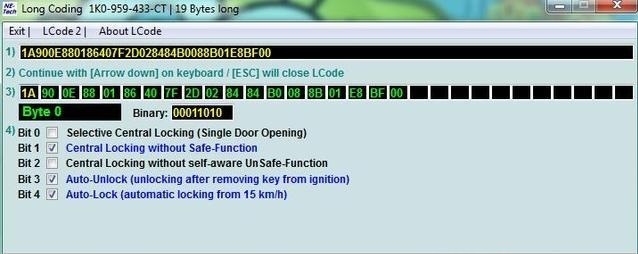
4 – Click on“Coding – 07” then on ” Long Coding Helper”.
Byte 0:
Bit 0 : Check “Selective Central Locking (Single Door Opening)”.
This post is also available in:
 Français (French)
