
Purpose: Displays the selected driving mode (Eco, Normal, Sport, Individual, etc.) directly on the on-board computer (ODB) or Virtual Cockpit.
Handy for instantly viewing the active profile without having to go through the multimedia menu. (Driving Mode / Drive Select)
Note : Ne fonctionne pas sur Golf 7R.
Proceed :
1 – Engine off, ignition off, connect your official VAG-COM VCDS cable to the computer, then plug the other end into your vehicle’s diagnostics socket.
2 – Switch on the ignition and run the VCDS program.
Line 1:
3 – Click “Select,” then click “19 – CAN Gateway.”
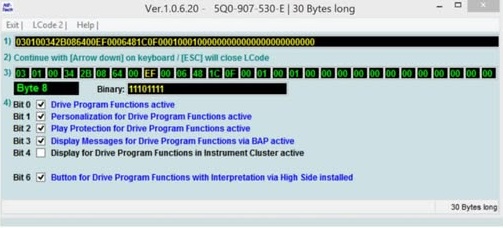
4 – Click on“Coding – 07” then on“Long Coding Helper” .
5 – Select byte “8“
. Then check bit “4“ (Display for Drive Program Functions in Instrument Cluster active).
This post is also available in:
 Français (French)
