
Purpose: Allows you to disable/enable the fog lights for a retrofit installation of an R-series front bumper without a bulb error. (To enable them, check the bits.)
Procedure:
1 – Engine off, ignition off, connect your official VAG-COM VCDS cable to the computer, then plug the other end into your vehicle’s diagnostics socket.
2 – Switch on the ignition and run the VCDS program.
Line 1 (AFTER late 2009) :
3 – Click “Select,” then click “ 09 – Cent. Elect.”
4 – Click on ” Code 07.”
5 – Select module “0” and click “Long Coding Helper”:
6 – Byte 14:
Uncheck Bit 0 ” Fog Lights Installed “

Line 1 (BEFORE the end of 2009):
3 – Click “Select,” then click “ 09 – Cent. Elect.”
4 – Click on ” Code 07.”
5 – Select module “0” and click “Long Coding Helper”:
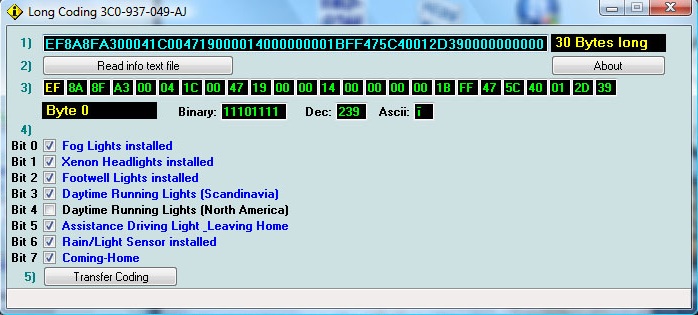
6 – Byte 0:
Bit 0: Uncheck “Fog Lights Installed”
This post is also available in:
 Français (French)
