

Purpose: Allows you to configure the door lock confirmation when using the key.
Proceed :
1 – Engine off, ignition off, connect your official VAG-COM VCDS cable to the computer, then plug the other end into your vehicle’s diagnostics socket.
2 – Switch on the ignition and run the VCDS program.
Line 1:
3 – Click on“Select”, then click on“46 – Comfort module“.
4 – Click “Adaptation – 10“
Channel 11
Set the value to 0 (no confirmation)
Set the value to 1 (confirmation with turn signals)
Set the value to 2 (confirmation with beep/horn)
Set the value to 3 (confirmation with turn signals and a beep/horn)
Line 2:
If the adaptation channel is not activated.
3 – Click on“Select”, then click on“46 – Comfort module“.
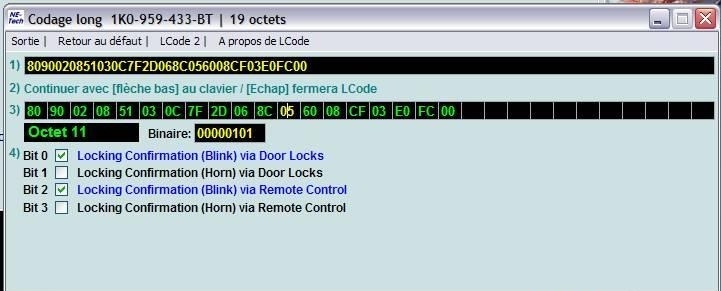
4 – Click on“Coding – 07” then on ” Long Coding Helper”.
Byte 11:
Bit 0: Check “Locking Confirmation (Blink) via Door Locks” (confirmation with blinking lights)
Bit 1: Check “Locking Confirmation (Horn) via Door Locks” (confirmation with a beep or horn)
This post is also available in:
 Français (French)
