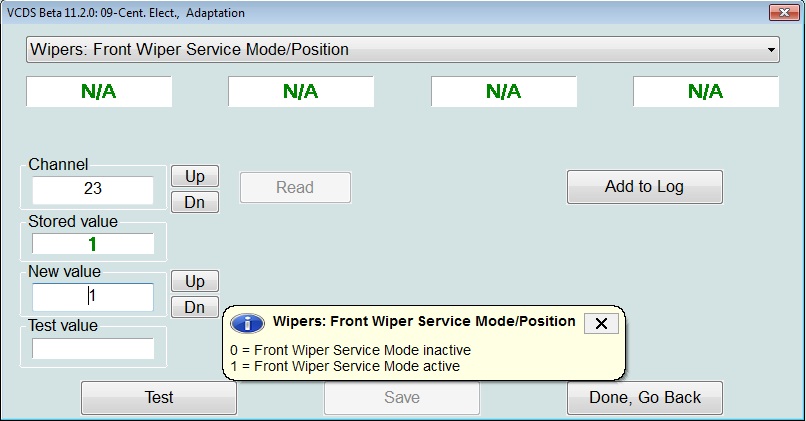
Purpose: activates changeover mode for front wipers.
Procedure:
1 – Engine off, ignition off, connect your official VAG-COM VCDS cable to the computer, then plug the other end into your vehicle’s diagnostics socket.
2 – Switch on the ignition, then run the VCDS program.
Line 1:
3 – Click on “Select”, then click on “09 – Cent. Elect.” . Switch on the ignition and run the VCDS program. 1 – Engine off, ignition off, connect your official VAG-COM VCDS cable to the computer, then plug the other end into your vehicle’s diagnostics socket.
4 – Click on “Coding 07”.
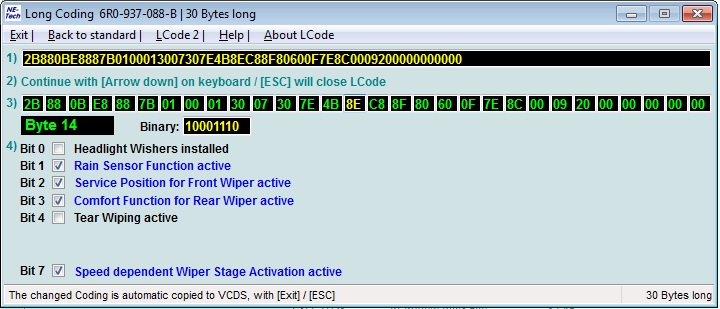
5 – Click on “Long Coding Helper” :
6 – In the window that appears, select,
Byte 14:
Bit 2: Check “Service Position for Front Wiper active”.
Line 2 :
3 – Click on “Select” then click on “09 – Cent. Elect.” .
4 – Click on “Adaptation – 10” .
5 – Select Channel 23: Set value to 1.