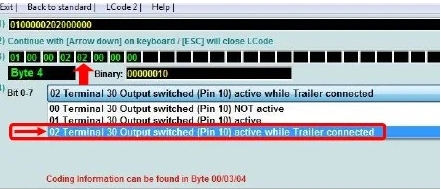
Purpose: Enables trailer / towbar retrofit.
Please note! Adaptation in motor control unit 01 is not accepted for some models. In this case, the coding may be ignored. Control units that are not installed can also be ignored. Please note that certain coding steps must be carried out according to the part numbers installed (camera).
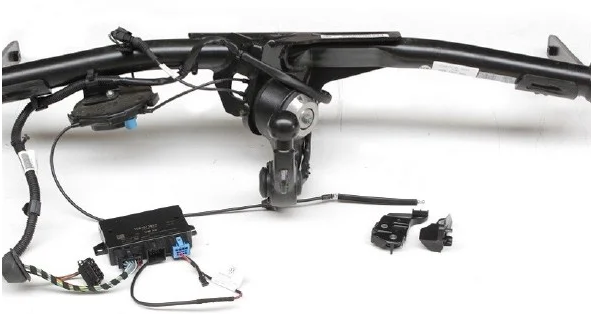
Watch out! There are a maximum of 12 lines of coding to do here, depending on the modules you have installed. Most ECUs have long coding with “trailer” to activate!
Proceed :
1 – Engine off, ignition off, connect your official VAG-COM VCDS cable to
the computer, then plug the other end into your vehicle’s diagnostics socket.
2 – Switch on the ignition and run the VCDS program.
Line 1:
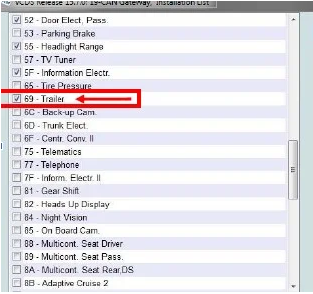
3 – Click on“Select”, then click on“19 – CAN Gateway”.
4 – Select “Installation List
5 – Tick:“69 – Trailer” in the list
6 – Save coding
Line 2:
3 – Click on“Select”, then click on“01 – Motor”.
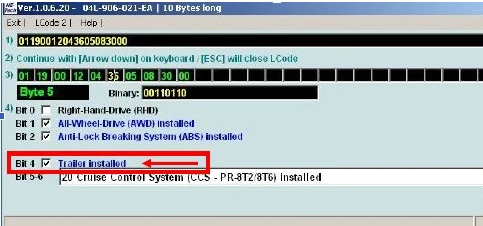
4 – Click on “Coding – 07” then click on“Long Coding Helper”.
5 – Select byte“05”
Then check Bit“4”:“Trailer installed”.
Line 3:
3 – Click on“Select” then click on “.09 – Cent. Elect.”.
For power plants with coding:
4 – Click on“Coding – 07” then click on“Long Coding Helper”
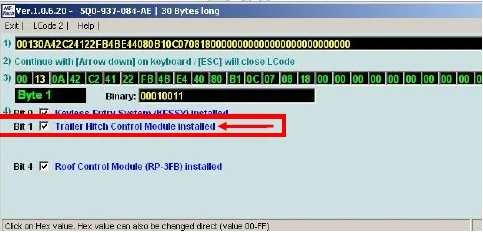
5 – Choose byte“01”
Then in this“Bit 0-7” drop-down menu, select“01 Trailer Connector Diagnosis active”.
Or Byte“01” check Bit 1“Trailer Hitch Control Module Installed”.
For power plants without coding :
4 – Click on“Security Access – 16” then enter the code“31347”.
5 – Click on“Adaptation – 10”.
6 – On this page, at the very top, there is a drop-down menu.
In this drop-down menu, choose“Networking trailer connection device”.
7 – On this same page, there’s a second drop-down menu at the bottom
of the page.
On this menu, select“built in” and confirm.
Line 4:
3 – Click on“Select” then click on“03 – ABS brake”.
4 – Click on“Security Access – 16” then enter the code“24990”.
5 – Click on“Adaptation – 10”.
6 – On this page, at the very top, there is a drop-down menu.
In this drop-down menu, choose“trailer stabilization”.
7 – On this same page, there’s a second drop-down menu at the bottom
of the page.
On this, select“Activated” and confirm.
Line 5:
3 – Click on“Select”, then click on“10 – Assistance stationnt”.
4 – Click on“Security Access – 16” then enter code“71679” (optional code)
5 – Click on “Coding – 07” then click on“Long Coding Helper”.
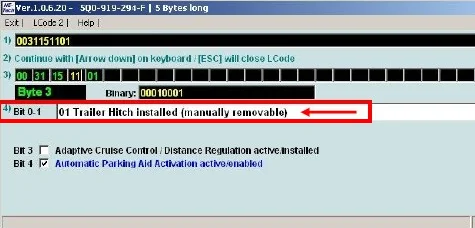
6 – Select byte“03”
Then check Bit 0-1 “01 Trailer Hitch installed (manually removable)”.
Line 6:
3 – Click on“Select” then click on “.13 – Auto Dist. Reg.“.
4 – Click on“Security Access – 16” then enter the code“14117” or“20103”.
5 – Click on “Coding – 07” then click on“Long Coding Helper”.
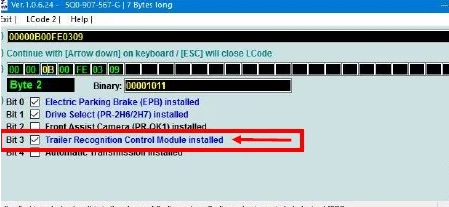
6 – Select byte“02” (camera 5Q0) or“03” (camera 2Q0/3Q0)
Then check Bit 3 “Trailer Recognition Control Module installed”.
Line 7:
3 – Click on“Select” then click on “.34 – Correct. Assiet. “.
4 – Click on “Coding – 07” then click on“Long Coding Helper”.
5 – Select byte“00”
Then check bit 7 (“trailer, 0 = not installed / 1 = installed”)
Line 8:
3 – Click on“Select”, then click on“3C – Lane Change”.
4 – Click on “Coding – 07” then click on“Long Coding Helper”.
5 – Select byte“02” (camera 5Q0) or“00” (camera 2Q0/3Q0)
Then check Bit 4-7 “10 or 20 ECU for draw bar, with ECU for draw bar”.
Line 9:
3 – Click on“Select”, then click on“6C – Camera recul”.
4 – Click on “Coding – 07” then click on“Long Coding Helper”.
5 – Select byte“04”
Then check bit 0 (“equipment_ahk, installed”)
Line 10:
3 – Click on“Select” then click on “.6D – Elect. Trunk “.
4 – Click on “Coding – 07” then click on“Long Coding Helper”.
5 – Select byte“01”
Then check bit 7 (“trailer, 0 = not installed / 1 = installed”)
Line 11:
3 – Click on“Select” then click on “.A5 – Frt. Sense. Drv. Assist“.
4 – Click on“Security Access – 16” then enter the code“20103”.
5 – Click on “Coding – 07” then click on“Long Coding Helper”.
6 – Choose the line according to your camera reference!
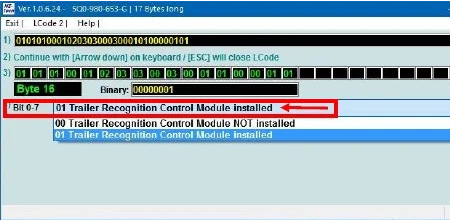
Select byte“16” (Camera 5Q0)
Then check bit 0-7 “01 trailer_control_module, installed”.
OR
Select byte“11” (Camera 3Q0)
Then check bit 0 (“AAG, 0 = not_coded / 1 = coded”).
OR
Select byte“05” (Camera 2Q0)
Then set bit 4 (“AAG, 0 = not_coded / 1 = coded”).
Line 12:
3 – Click on“Select” and then click on ” “.69 – Trailer“.
4 – Click on “Coding – 07” then click on“Long Coding Helper”.
5 – Select byte“01”
Then check Bit 0-3 “01 Diagnosis of the line to the socket, active”.
Select byte“03”
Then check Bit 0-3 “01 Terminal 30 output (pin 9 socket), activated”.
OR
Select byte“04”
Then check Bit 0-7 “02 Terminal 30 output switched (pin 10) Trailer connected”.