
Purpose: Allows you to reconfigure the Push-To-Talk (PTT) button at the bottom left of your multifunction steering wheel to function as a mute button for the audio volume. (2010 and later)
Procedure:
1 – Engine off, ignition off, connect your official VAG-COM VCDS cable to the computer, then plug the other end into your vehicle’s diagnostics socket.
2 – Switch on the ignition and run the VCDS program.
Line 1:
3 – Click “ Select,” then click “ 16 – Multifunction Steering Wheel.”
4 – Click on“Coding- 07”. then click on“Long Coding Helper”.
5 – Select Byte 1:
Bit 3: Uncheck “Multi-Function-Steering-Wheel (MFSW) with Push-To-Talk (PPT) Button installed”.
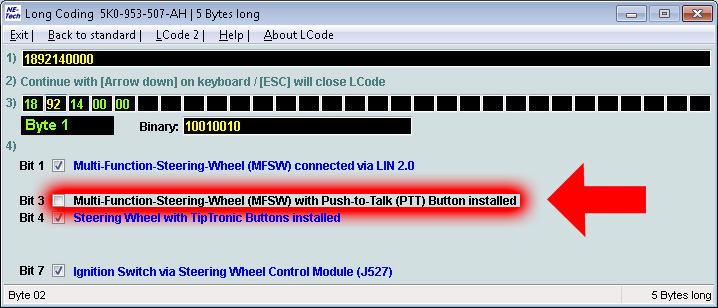
The Push-to-Talk (PPT) button now acts as a mute button.
This post is also available in:
 Français (French)
