
Purpose: to activate the reversing camera (Standard RVC) after retrofit.
Please note: Reversing radars and MMI 3G are required.
Only Q5 8R phase 1, coding for Facelift
Proceed :
1 – Engine off, ignition off, connect your official VAG-COM VCDS cable to the computer, then plug the other end into your vehicle’s diagnostics socket.
2 – Switch on the ignition and run the VCDS program.
Line 1:
3 – Click on“Select”, then click on“10 – Parking assistance”.
4 – Click on“Security Access – 16” then enter the code“71679”.
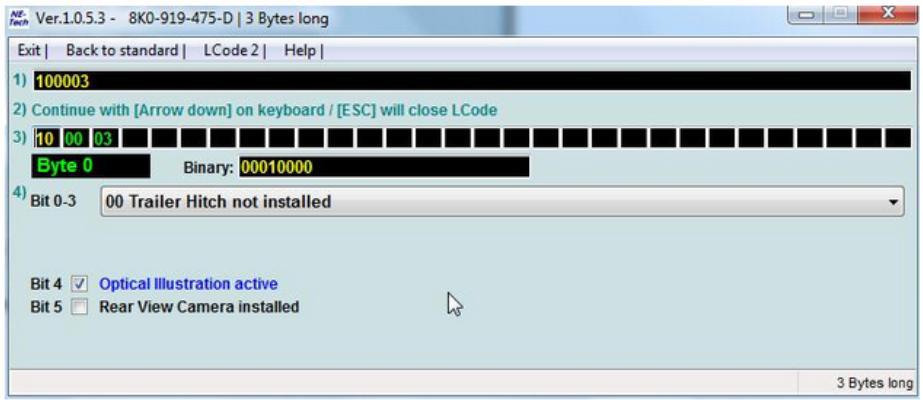
5 – Click on“Coding – 07” then click on“Long Coding Helper”.
6 – Select byte 0
Then check bit 5 “Rear View Camera installed”.
bit 4 must be set normally (radar on MMI)
Reboot MMI
Hardware upgrade :
The camera’s video cable is connected to the infotainment control unit. This is installed under the screen (Audi Multimedia).
The 2 rearview camera pins are used in the 12-pin quadlock (blue).
Quadblock Assignment :
Pin 11 = video line
Pin 5 = shielding

