
Purpose: Enables Audi Drive Select Individual and allows it to be controlled via the MMI.
Procedure:
1 – Engine off, ignition off, connect your official VAG-COM VCDS cable to the computer, then plug the other end into your vehicle’s diagnostics socket.
2 – Switch on the ignition and run the VCDS program.
Step 1: Enable ADS in the Power Control Unit
Line 1:
3 – Click “Select,” then click “09 – Cent. Elect.”
4 – Click on“Coding – 07” then on“Long Coding Helper” .
5 – Select Byte 7:
Bit 5: Check “Drive Select installed”
Then Byte 8:
Bit 1: Check “Enable Steering in ADS” (Enables dynamic steering)
Bit 2: Check “Enable Engine in ADS Menu” (Enables engine/transmission)
Bit 3: Check “Enable Suspension in ADS Menu ” (Enables controlled damping if factory-equipped!)
Bit 4: Check “Enable Steering in ADS Menu” (Enables Dynamic Steering)
Bit 5: Check “Enable Sport Differential in ADS Menu” (Enables the sport differential)
Then Byte 17:
Bit 7: Check the box
Line 2:
3 – Click “Select,” then click “09 – Cent. Elect.”
4 – Click “Security Access – 16,” then enter the code “20113”
4 – Click “Adaptation – 10.”
5 – Select Channel 63 / 64 / 65 / 66
Set the value to 4 (Individual) to all channels.
Step 2: Open the menu in the MMI
For the MMI Basic Plus
[07 – Control Head] -> [Adaptation -10] -> Channel 01
Add 32 to the existing value
For the MMI 2G
The hidden menu must be enabled! (See: Enabling the Hidden Menu on the MMI 2G )
Launch the Hidden Menu by pressing SETUP + CAR (for 6 seconds)
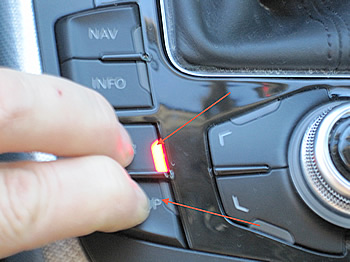
DIAG SETTINGS -> Car Menu Screen -> Charisma -> Check the box
Don’t forget to confirm the changes by selecting “Accept changes”
For the 3G MMI
The hidden menu must be enabled! (See: Enabling the Hidden Menu on the MMI 3G )
Launch the Hidden Menu by pressing SETUP + CAR (for 6 seconds)
car -> carmenuoperation -> charisma -> select “5”
Press “Return”
car -> cardevicelist -> charisma -> check the box
Restart the MMI by pressing SETUP + the dial + the upper-right button.
This post is also available in:
 Français (French)
