
Purpose: Automatically closes the windows and sunroof when it rains.
The vehicle must be locked using the remote control for this to work.
Procedure:
1 – Engine off, ignition off, connect your official VAG-COM VCDS cable to the computer, then plug the other end into your vehicle’s diagnostics socket.
2 – Switch on the ignition, then run the VCDS program.
Line 1:
3 – Click on ” Select “, then click on ” 09 – Cent. Elect.” . Switch on the ignition and run the VCDS program. 1 – Engine off, ignition off, connect your official VAG-COM VCDS cable to the computer, then plug the other end into your vehicle’s diagnostics socket.
4 – Click on “ Code 07.”
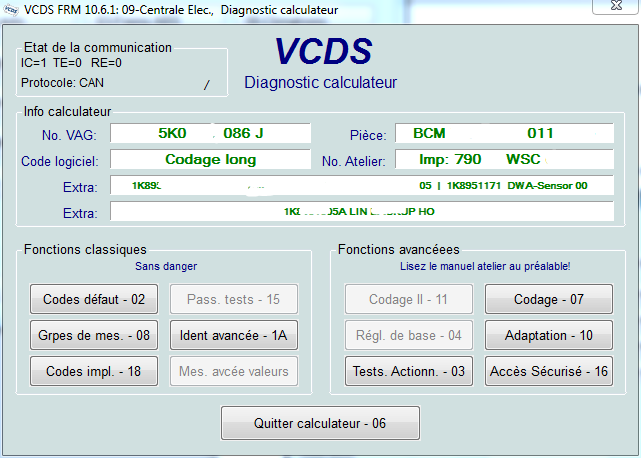
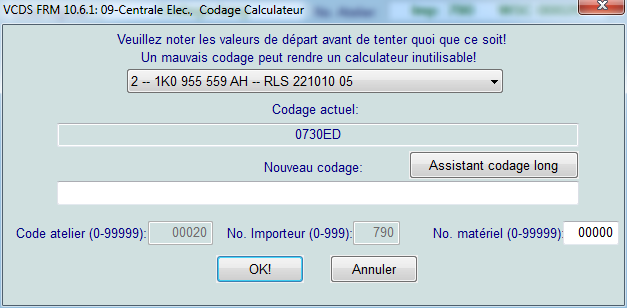
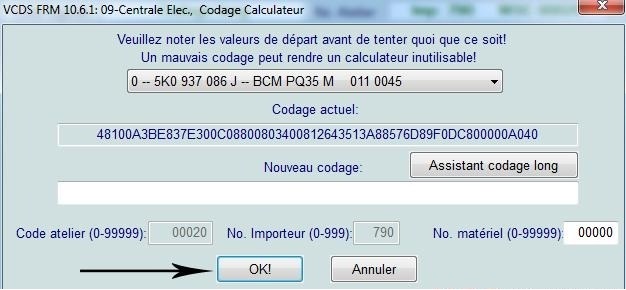
5 – Select module “2” and click ” Long Coding Helper “:
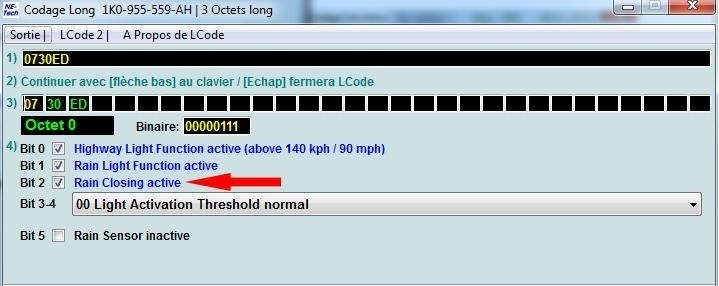
6 – In the window that appears, select byte 0 and check bit 2, “Rain Closing active,” to enable the windows and roof to close when it rains:
7 – After completing this step, click on the “Exit” menu
Then click “OK”
Line 2:
3 – Click “Select,” then click “46 – Central Conv”
4 – Click on “ Code 07.”
5 – Then click ” Long Coding Helper “
Byte 9:
Bit 1: Check “Rain Closing (0 = nonrecurring / 1 = permanent)”
Bit 2: Uncheck “Comfort Closing via Rain Light Sensor (Rain Closing) inactive”
This post is also available in:
 Français (French)
