

Purpose: activates the display of reversing radars on the MMI, for vehicles with the Audi Parking System rear option only.
Requires at least module 8X0-919-475-F
On certain vehicles equipped with the 8X0-919-475-F module, activation does not work.
There are no issues with vehicles equipped with the 8X0-919-475-M module.
Procedure:
1– Engine off, ignition off, connect your official VAG-COM VCDS cable to
the computer, then plug the other end into your vehicle’s diagnostics socket.
2 – Switch on the ignition and run the VCDS program.
Line 1:
3 – Click on “Select” and then click on “10 – Assistance stationn” .
4 – Click on “Security Access – 16” then enter the code “71679”.
5 – Click on “Coding – 07” then“Long Coding Helper”.
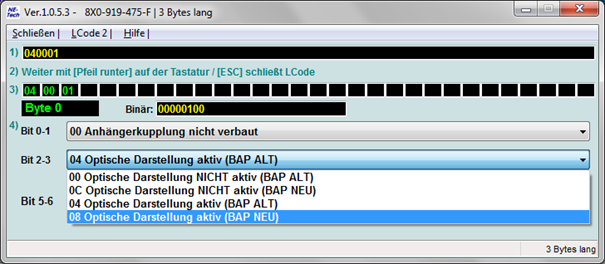
6 – Byte 0:
Bits 2–3: Select “08 Optical Illustration active (BAP NEW)”
If this does not work after restarting the MMI, select “04 Active Optical Display (BAP ALT)”
Restart MMI
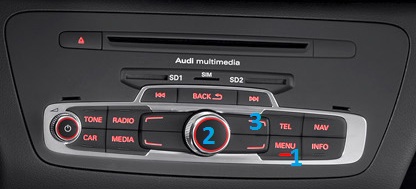
Method 1
Hold MENU (1) + Wheel (2) + Top right button (3) for 6 sec.
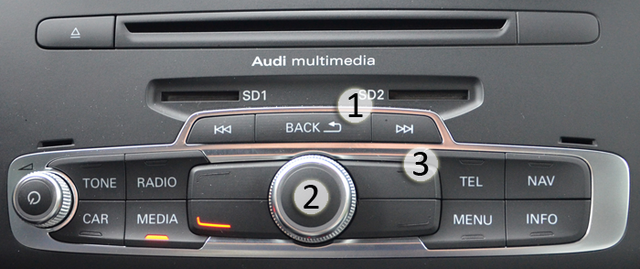
Method 2 (if method 1 doesn’t work)
Hold BACK (1) + Wheel (2) + Top Right Button (3) for 6 sec.
Line 2:
3 – Click on “Select” and then click on “10 – Assistance stationn” .
4 – Click on “Adaptation – 10”.
6 – Select “Visual display for park assist” from the drop-down list
Change value with OPS Display
This post is also available in:
 Français (French)
