

Function: Automatically folds the side mirrors when the vehicle is locked.
Procedure:
1 – Engine off, ignition off, connect your official VAG-COM VCDS cable to the computer, then plug the other end into your vehicle’s diagnostics socket.
2 – Switch on the ignition and run the VCDS program.
Line 1 :
3 – Click “ Select,” then click“42 – Driver’s Door.”
4 – Click on “Coding – 07” then “Long Coding Helper”.
5 – Select Byte 04:
Check Bit 6 (If it is a hidden bit, you must modify the binary value directly (replace the 0 with a 1, e.g.,01011100)).
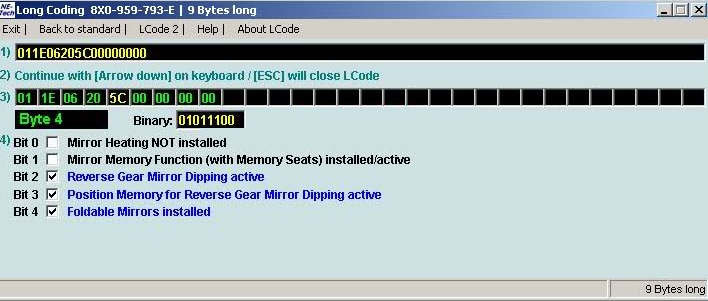
Line 2:
3 – Click “ Select,” then click“52 – Passenger Door.”
4 – Click on “Coding – 07” then “Long Coding Helper”.
5 – Select Byte 04:
. Set Bit 6 (If it is a hidden bit, you must modify the binary value directly (replace the 0 with a 1, e.g.,01011100)).
Notes:
- The side mirrors will extend automatically when the ignition is turned on.
- The side mirrors will fold in automatically when you lock the vehicle with the remote control.
- To automatically fold the side mirrors using the Audi Advanced Key, you must press and hold the button on the door handle…
This post is also available in:
 Français (French)
