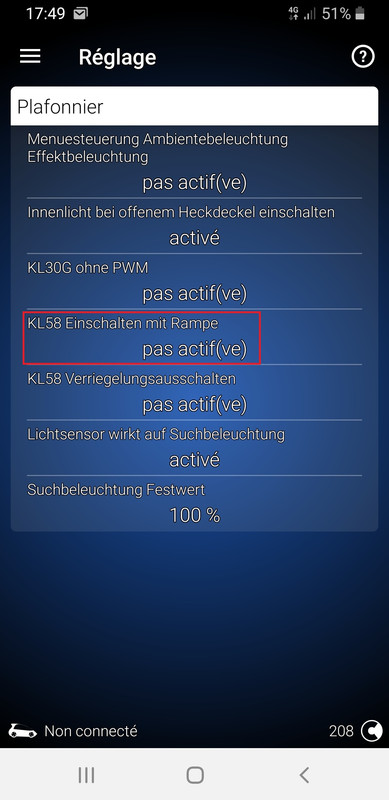
Purpose: turns interior lights (door knobs, dashboard, center console) on and off gradually. By default, interior lights are switched on and off immediately with the headlights. Activating this function will result in a slow fade effect each time the interior lights are switched on or off. (Interior Light Fade in/out)
SFD: yes
Proceed :
1 – Engine off, ignition off, connect your official VAG-COM VCDS cable to the computer, then plug the other end into your vehicle’s diagnostic socket or OBDeleven box.
2 – Switch on the ignition and run the VCDS program or the OBDeleven application.
Line 1:
3 – Click on“Select” then click on “.19- Gateway“.
4 – Unlock SFD protection
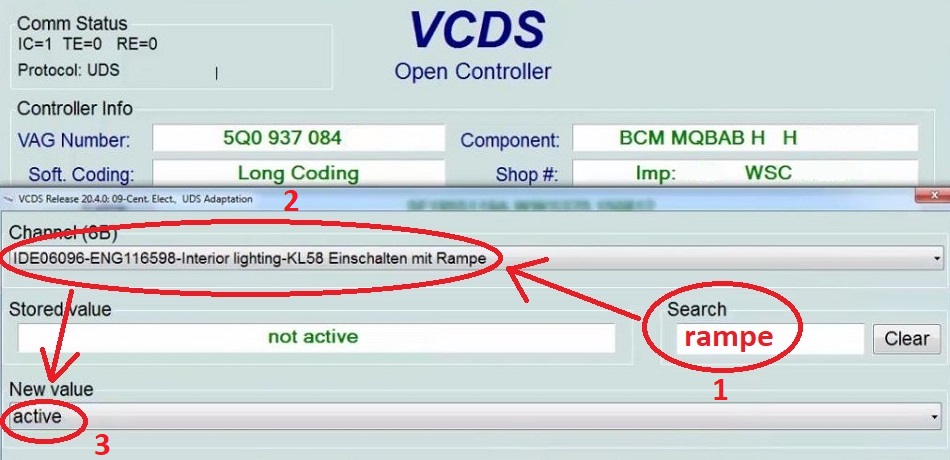
5 – Click on“Adaptation – 10”.
6 – On this page, at the very top, there is a drop-down menu.
In this drop-down menu, choose“Suchbeleuchtung_allgemein – KL58 Einschalten mit Rampe“.
7 – On this same page, there is a second drop-down menu at the bottom
of the page.
On this menu, select“active” and confirm.
OBDeleven: