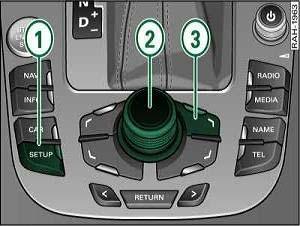
Purpose: to adjust Bluetooth microphone sensitivity with Audi MMI.
Procedure:
1 – Engine off, ignition off, connect your official VAG-COM VCDS cable to the computer, then plug the other end into your vehicle’s diagnostics socket.
2 – Switch on the ignition and run the VCDS program.
For MMI 2G :
3 – Click on“Select”, then click on“77 – Telephone”.
4 – Click on“Adaptation – 10”.
5 – On this page, at the top, there is a drop-down menu.
In this drop-down menu, choose Channel 131 or 07.
7 – On this same page, there is a second drop-down menu at the bottom of the page.
On this menu, choose a value expressed in“dB” (default value“0 dB”) then validate.
For MMI 3G :
To continue, you must first activate the hidden MMI menu (Green Menu).
To activate the MMI hidden menu (Green Menu) : Activate MMI 3G Hidden Menu
Press CAR + SETUP for 6 sec to bring up the hidden menu.
main > diagnostics > settings > Mic sensiblity
Choose a value between : -6db/0db/+6db
Restart MMI
Simultaneously press SETUP (1) + Central knob (2) + Top right knob (3)